
When you are using Odoo, thoughts like these may come up:
- "It would be good if this feature worked a little more like that"
- "We need something along these lines for Japan"
- "Could this handy feature be shared with other people?"
Have you ever found yourself thinking that?
Taking improvements and ideas like those and making them real together with developers all over the world is what Odoo community (OCA) work is.
In this article, for anyone asking
"What is the OCA?"
"How do I get started?"
we set out that first step in plain terms.
What the OCA is
The OCA (Odoo Community Association) is an international non-profit body that exists to make Odoo's Community Edition better.
Developers and companies from all over the world work together on:
- developing modules that add features
- fixing defects
- translation
- code review
Those are the kinds of thing it does.
Do have a look at these articles for more detail.
OCA information sites
Here are the sites worth knowing about as you start out in OCA work.
🌐 The official OCA site (where you get the overall picture)
This is the “official front door”, where the OCA's principles, its activities and its guidelines are gathered. It is the best place to understand what kind of body the OCA is and what it works towards.
- How-to guides: https://odoo-community.org/how-to-guides
The OCA's rules and the flow of contribution are set out here systematically.
- OCA app store: https://apps.odoo-community.org/shop
You can search the modules the OCA publishes. Note, though, that not every OCA module is listed there, so when looking for an app it is safer to use GitHub alongside it.
💻 GitHub (the centre where the actual development and discussion happen)
This is the “inner keep” of OCA work. Module development, issue discussion, PR review — all the real work happens here.
- OCA Guidelines:https://github.com/OCA/odoo-community.org/blob/master/website/Contribution/CONTRIBUTING.rst
A document gathering the common rules for OCA module development.
Repositories in frequent use:
- Japanese localisation (l10n-japan): https://github.com/OCA/l10n-japan/
Modules covering Japanese accounting, tax and business practice are gathered here. A great many improvements that matter to Japanese companies using Odoo are discussed here.
- OCB (Odoo Community Backports): https://github.com/OCA/OCB
A repository where the OCA does its own bug fixing and security work for versions Odoo S.A. has stopped supporting. For companies running Odoo over the long term it matters a great deal.
🌏 Weblate (the translation platform)
https://translation.odoo-community.org/
The site that manages the translation of OCA modules.
Even if English is not your strength, translation is a relatively easy way in. Because you translate in the browser, there is nothing to set up and you can take part without technical knowledge.
For how translation on Weblate works, please see this material for the procedure.
How do you start OCA work?
"I would like to join in, but it looks rather difficult…" — a good many people feel that way.
There are two main reasons.
- It is an international community, so exchanges are in English as a rule
- There are a lot of mechanisms and rules, and the overall picture is hard to grasp
That said, translation tools have become very good, and the language barrier is far lower than it used to be. With a web browser's translation feature or a tool such as DeepL, exchanges in English are perfectly manageable.
Also, while detailed information about the OCA is plentiful in English, there is almost nothing that gathers the overall picture in Japanese.
So this article sets things out so that you can take in the outline of OCA work and get that first step taken.
What is a good place to start? (in order of how easy it is to pick up)
There are many forms that taking part in OCA work can take.
Here we go through them in the order a beginner will find easiest to pick up.
1. Translation (★☆☆)
Translation is the easiest thing to begin with.
- correcting the Japanese
- adding the parts not yet translated
- making terminology consistent
You can take part without development skills.
To start translating, first send the language you want to translate and the email address you want registered to transbot@odoo-community.org and register an account. After that, the translation itself is done on Weblate, the translation platform.
Detailed information on OCA translation is here
2. Review (★☆☆)
The next step is reviewing pull requests (PRs — proposed improvements).
In the OCA, a PR that someone opens is always merged only after a third party has checked it, which is to say reviewed it.
- checking the code
- functional testing
- raising points in comments
Review matters just as much as development does.
Anyone with a GitHub account can post a review.
The OCA's page on reviewing is here
Reviews come in two kinds, code review and functional review, and a functional review can be done by reaching an OCA Odoo instance from GitHub, without setting anything up yourself.
【Functional review using Runboat】
①. Select a PR in a repository under OCA and show all of the check results.
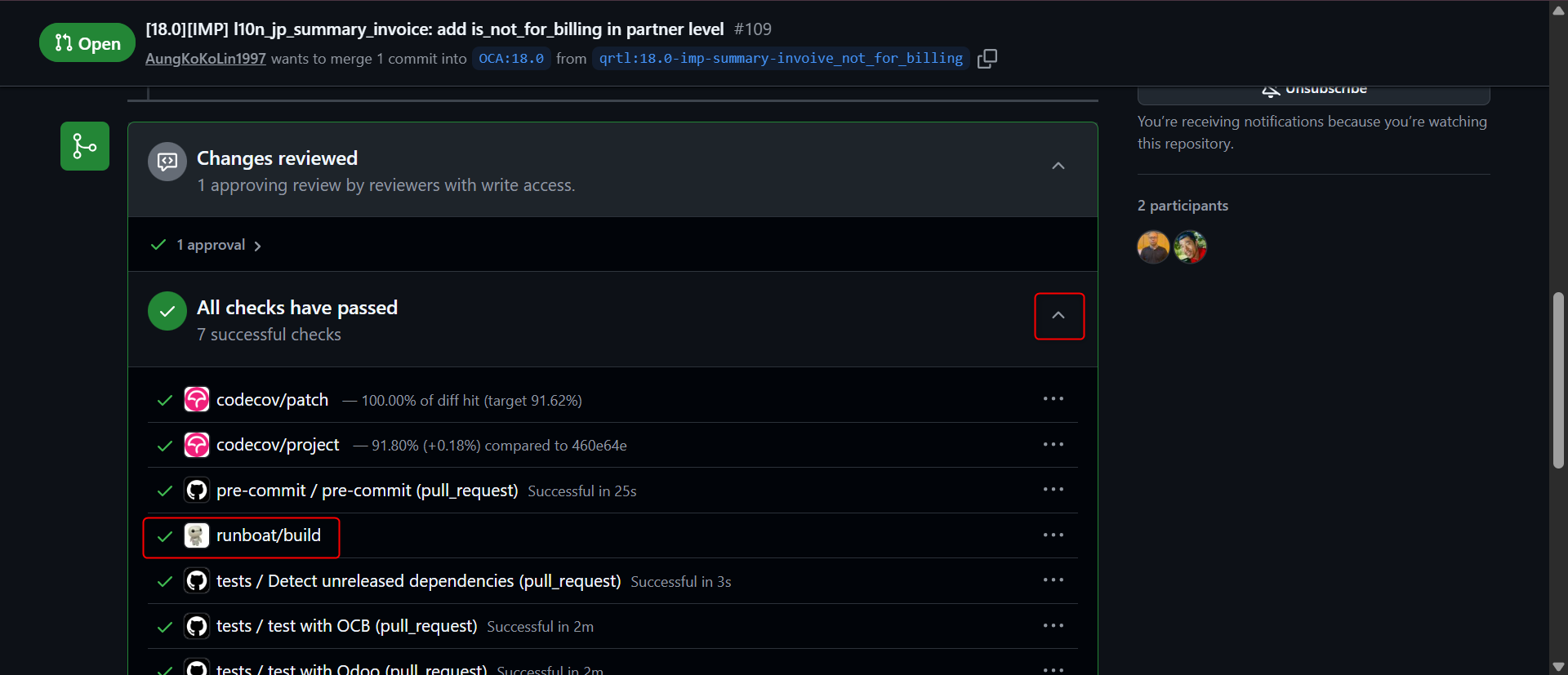
②. Click runboat/build.
If it is not green, press the "Start" button and wait for it to come up.
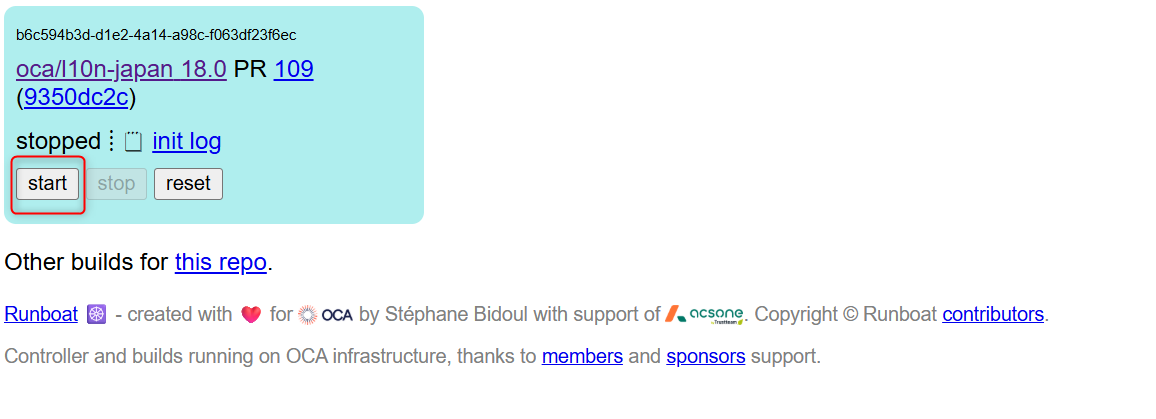
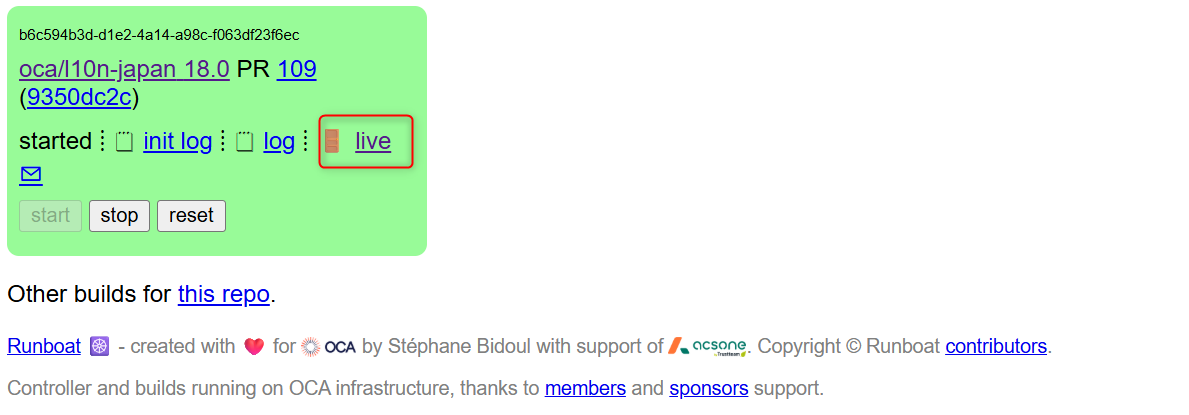
Once it turns green, click the "live" button.
③. Log in to Odoo.
Two databases are shown.
- the one ending in "baseonly": an instance with no modules installed at all
- the other one: an instance with the PR repository's module and its dependencies installed
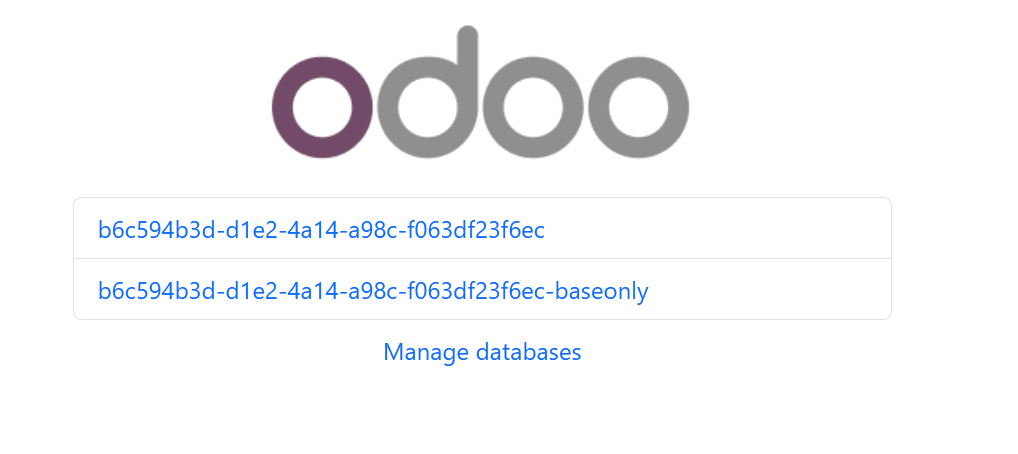
Select either of the databases and log in with user ID: admin, password: admin.
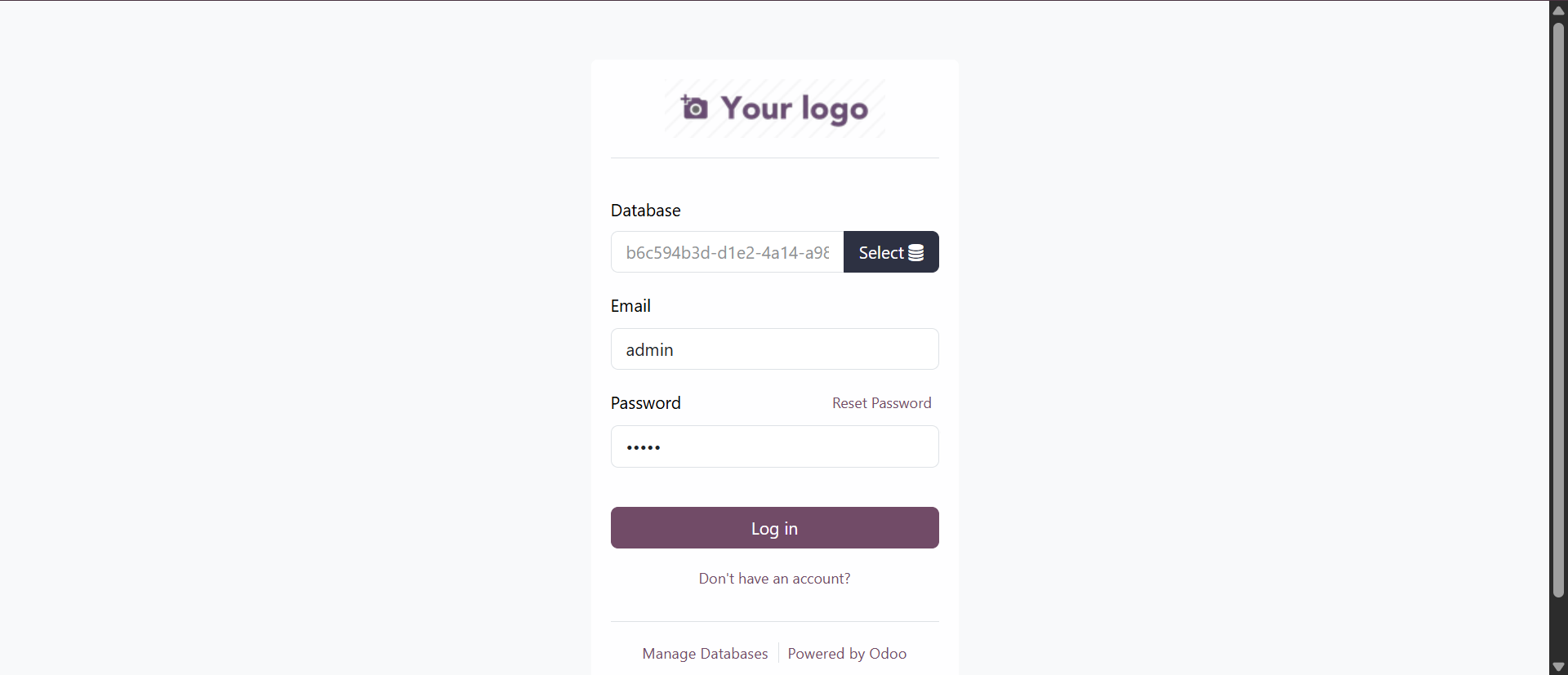
In the instance you have logged in to, you are free to run functional tests.
④. Register your review
Select the "File Changed" tab and click "Submit Review".
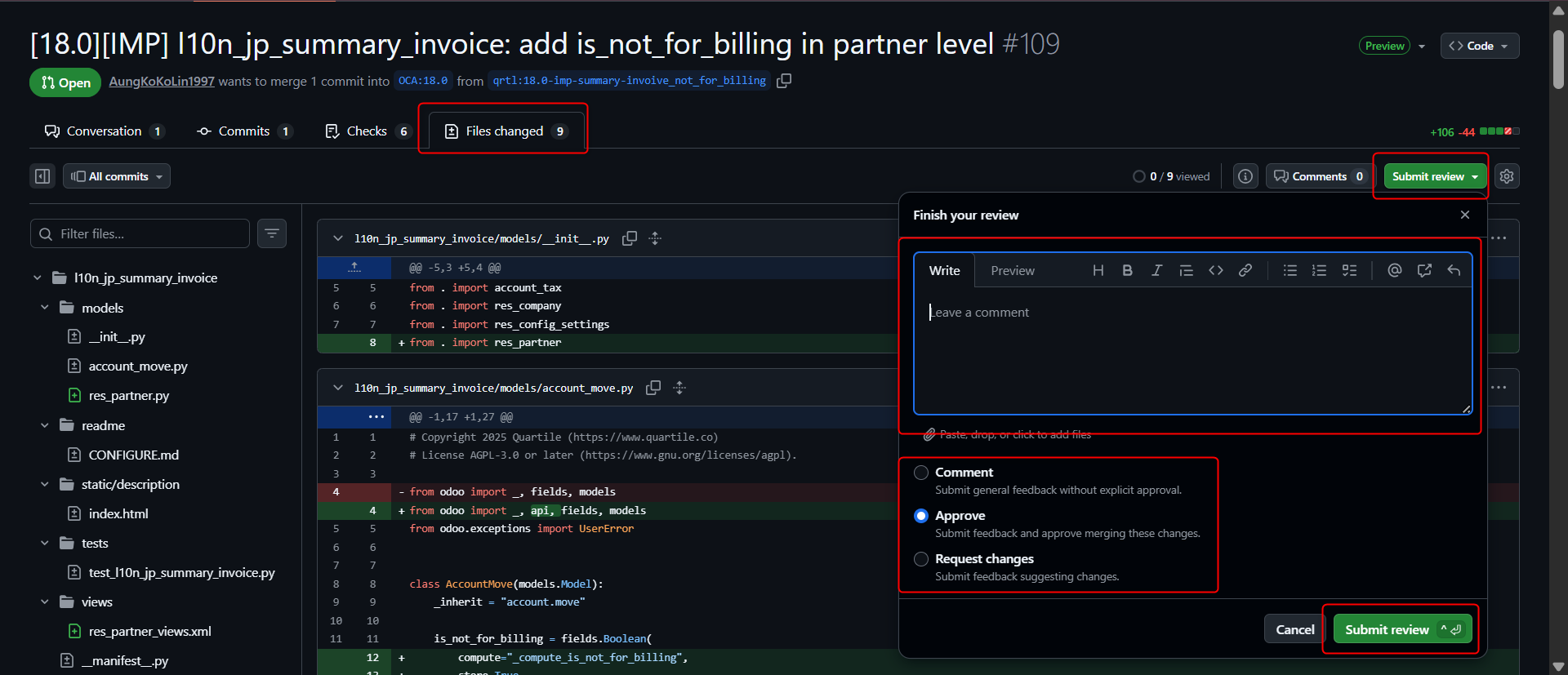
Enter a comment, then pick "Approve" if the test results were as expected, and otherwise "Comment" or "Request Changes", and click "Submit Review".
【Code review】
For the outcome of reviewing code, register the content and the result in the same way as "④. Register your review" above.
※ For the review comment, enter concisely and in English what you checked in testing — behaviour, edge cases, tests, readability and so on.
3. Reporting bugs (★★☆)
If you find a bug in an OCA module, raise an issue on GitHub.
Detailed information on reporting bugs is here
①. Identify the repository with the bug, open the Issues tab, and click the "New Issue" button.
※ Before creating an issue, check that an issue covering the same problem does not already exist.
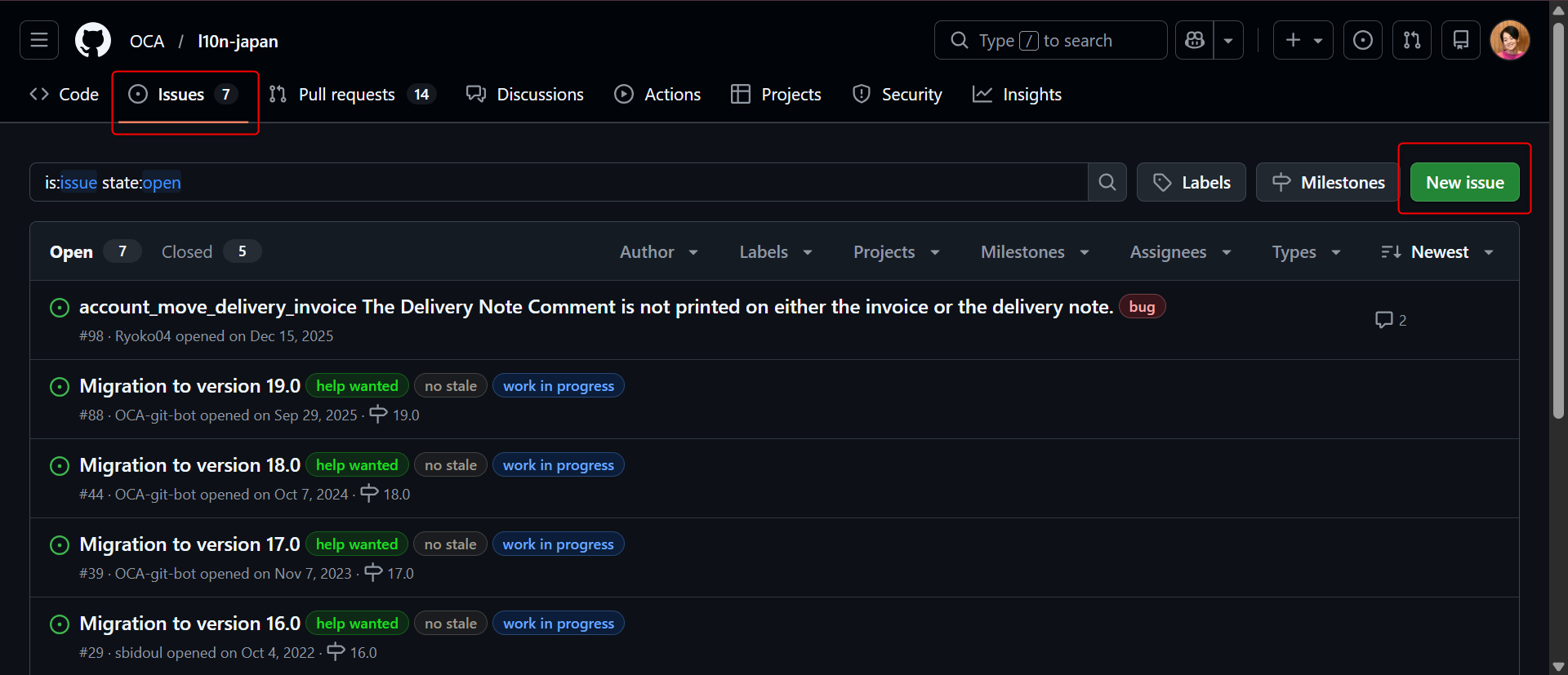
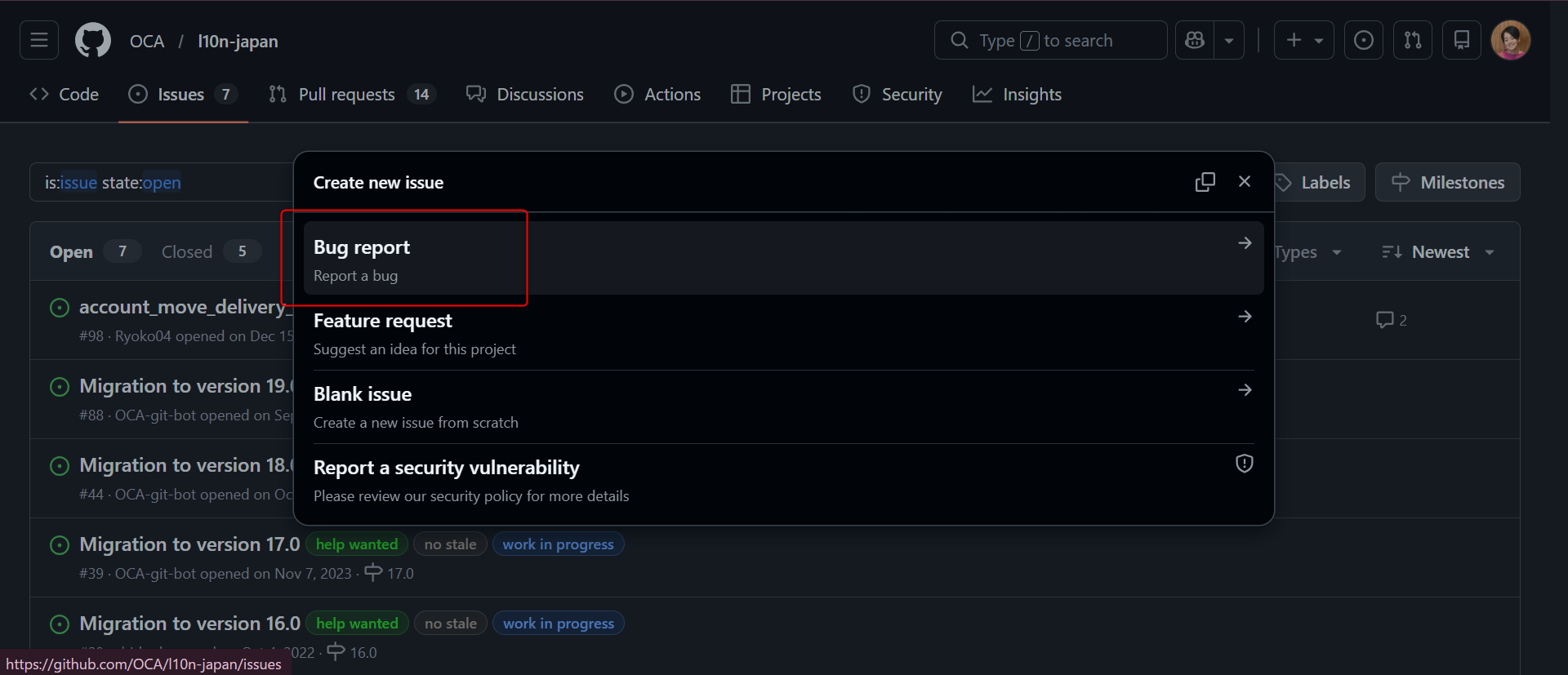
②. Select "Bug Report".
③. Report the details of the bug.
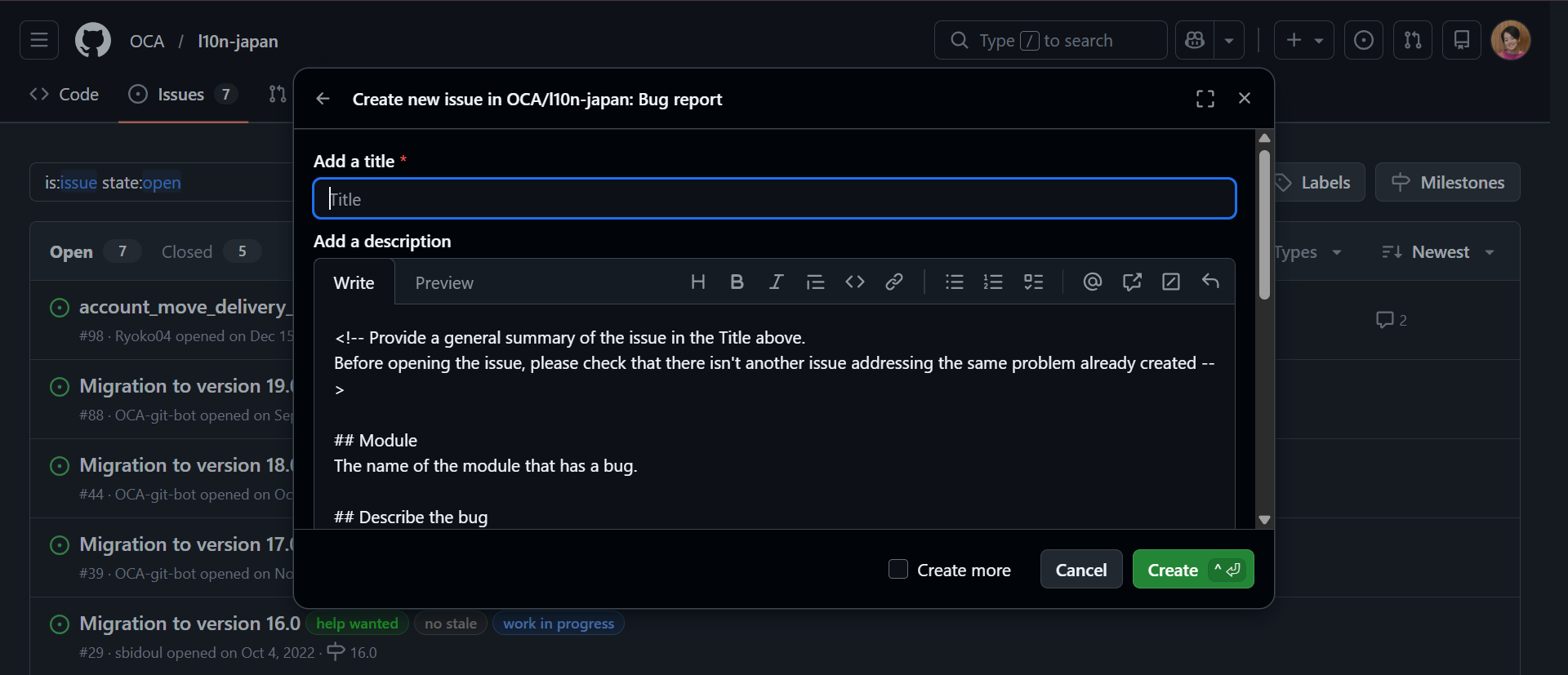
Title: state concisely what the bug is.
Module: give the name of the module where the bug occurs.
Describe the bug: explain the bug that is occurring concisely and clearly.
To Reproduce: give the steps that reproduce the bug. 1. 2. 3.
Affected versions: the version
Expected behavior: the expected behaviour. Describe how it should have behaved.
Additional context: additional information. Give any other information relating to the problem (the OS, the Python version, and so on).
※ Other contributors may ask you for extra information that helps pin the bug down. Always answer them. If you have the skills, write the fix and share it.
※ Cases where a reported bug is dealt with straight away may well be rare. Writing the issue concisely and clearly is what matters.
4. Proposing improvements (★★☆)
If you want to fix a bug in an existing OCA module or add a feature, you change the code itself and open a PR (pull request) on GitHub.
Detailed information on creating a PR is here
The OCA guidelines are what you follow in making the change and submitting the PR. Only the outline of the procedure is given here.
①. Register the CLA.
CLA (Contributor License Agreement)
https://odoo-community.org/about/cla
※ To contribute code to the OCA, a CLA is required first.
②. Fork the repository you will open the PR against, and clone it into your development environment.
③. In your development environment, commit the change on a local branch and push it to your forked GitHub repository.
For the commit message, follow the commit message conventions as they are given.
④. Create the PR.
In the PR, enter a description so that the reviewers can see where things stand. Where there is a related issue, add a link to that issue.
※ Once all of the PR's checks pass and turn green, and it gains three positive reviews within five days (two if it goes beyond five days), it is merged. At least one of those reviews must come from a member of the PSC (Project Steering Committee) or from an OCA core maintainer.
5. Version upgrade work (★★☆)
Odoo puts out a new version every year. Migrating an existing module to a new version is an important contribution too.
Depending on the module there are cases where almost no change from the old version is needed; but where the related part of Odoo itself has changed substantially in the upgrade, there are also cases where the dependent OCA module needs substantial change as well.
Version upgrade work is unglamorous, but it is of very high value to the community.
Detailed information on version upgrade development for OCA modules is here
As for the procedure, it is done on GitHub, the same as "4. Proposing improvements".
6. Proposing a new module (★★★)
The hardest of all is proposing a new module. It calls for a deep understanding of Odoo's standard features, of the development rules and of the OCA, along with design ability.
- gathering the requirements
- design
- implementation
- testing
- writing the documentation
As for the procedure, it is done on GitHub, the same as "4. Proposing improvements".
What matters is taking it on step by step
There is no need to aim at advanced development from the very start.
translation and review → reporting bugs → small fixes → version upgrades → proposing a new module
Deepening your involvement little by little along those lines is the ideal.
Because community work takes place among people, there is a tendency for issues and PRs to be reviewed more readily the more of a track record you have.
OCA work brings:
- a deeper understanding of Odoo
- connections with developers all over the world
- a track record that stays open to view
- proof of your technical ability
Those are substantial benefits.
Beginning with "just looking" is perfectly fine.
GitHub is the place to start: look at what OCA modules there are, and read the issues and PRs other people have created.
That is where your own community work begins.
How to start with Odoo community (OCA) work — an overview