
Odoo Experience, now a fixture every autumn, was held again this year in Brussels, Belgium, from 24 to 26 September 2026. It was a large event, with around 45,000 attendees over the three days.
This year's Odoo Experience saw the announcement of the new version of Odoo, Odoo 20.0.
Drawing on the keynotes that Odoo CEO Fabien Pinckaers gave on day one and day two, this post introduces the main new features and improvements in Odoo 20, and the changes to its pricing.
We also cover the Japanese localization, which the keynotes did not touch on, based on the Odoo 20 release notes.
A colleague who attended has written a detailed report on this year's Odoo Experience. It also covers OCA Days, and describes the Odoo community and ecosystem as seen on the ground, so please read that too.
The main topics in Odoo 20
Odoo 20 brings major advances across many features, AI first among them. From what the keynotes presented and from the release notes, we pick out the points most worth attention under the five headings below.
- Advances in AI (artificial intelligence)
- 100 industry solutions (Industries)
- Other improvements
- Pricing changes
- Japanese localization
Advances in AI (artificial intelligence)
AI is one of the areas where Odoo 20 has moved furthest.
If the AI of earlier versions was for asking questions about Odoo, Odoo 20 moves towards handing Odoo work over to the AI.
It can create and update records in Odoo, analyse information, read the contents of files, and work together with other automations.
For example, you can leave the AI to create projects and tasks from the information in an email or a file, or to build a new web page from instructions in plain language.
A business system handles large volumes of data every day, yet entering and checking that data takes people's time. As AI gradually takes over that work, staff can expect to spend less time on simple data entry and more on work that matters more, such as checking and analysing the figures.
The AI is easier to understand in action, so we link to the relevant part of the video for each feature. Do take a look.
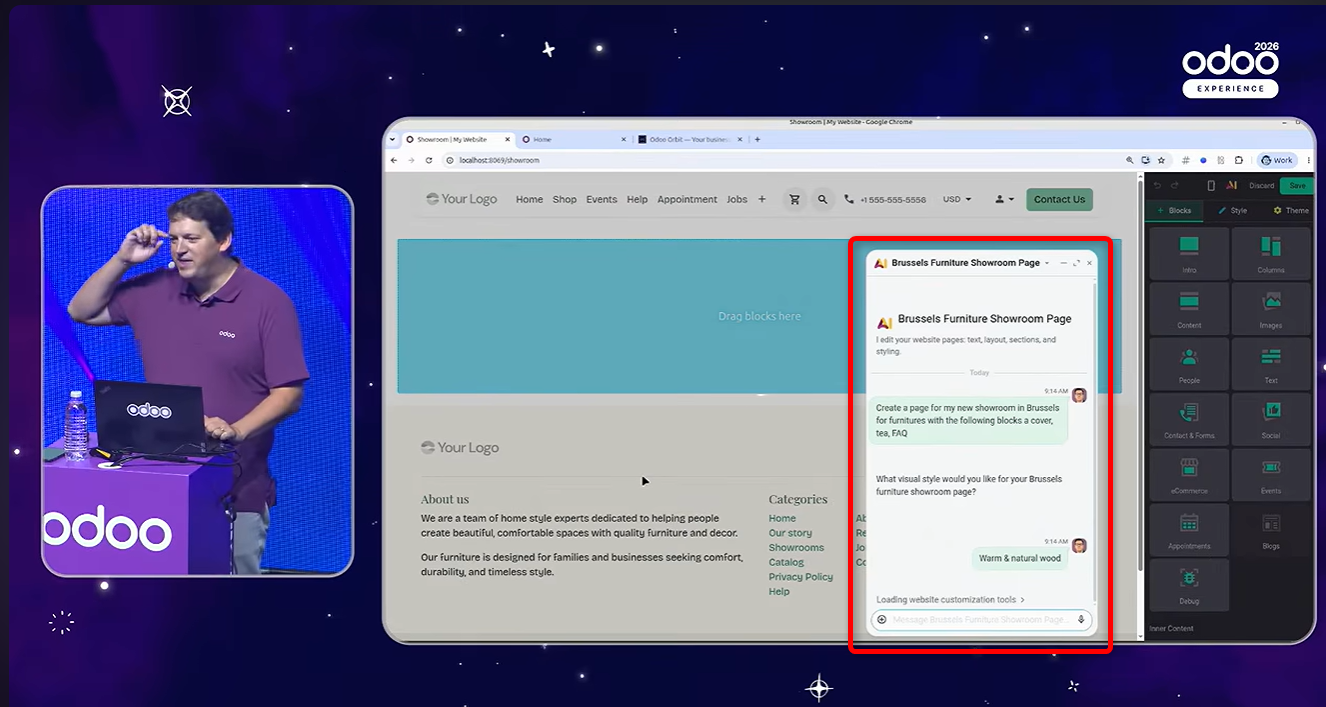
Building web pages
Describe in words the content and look of the web page you want, and the AI builds a page to match.
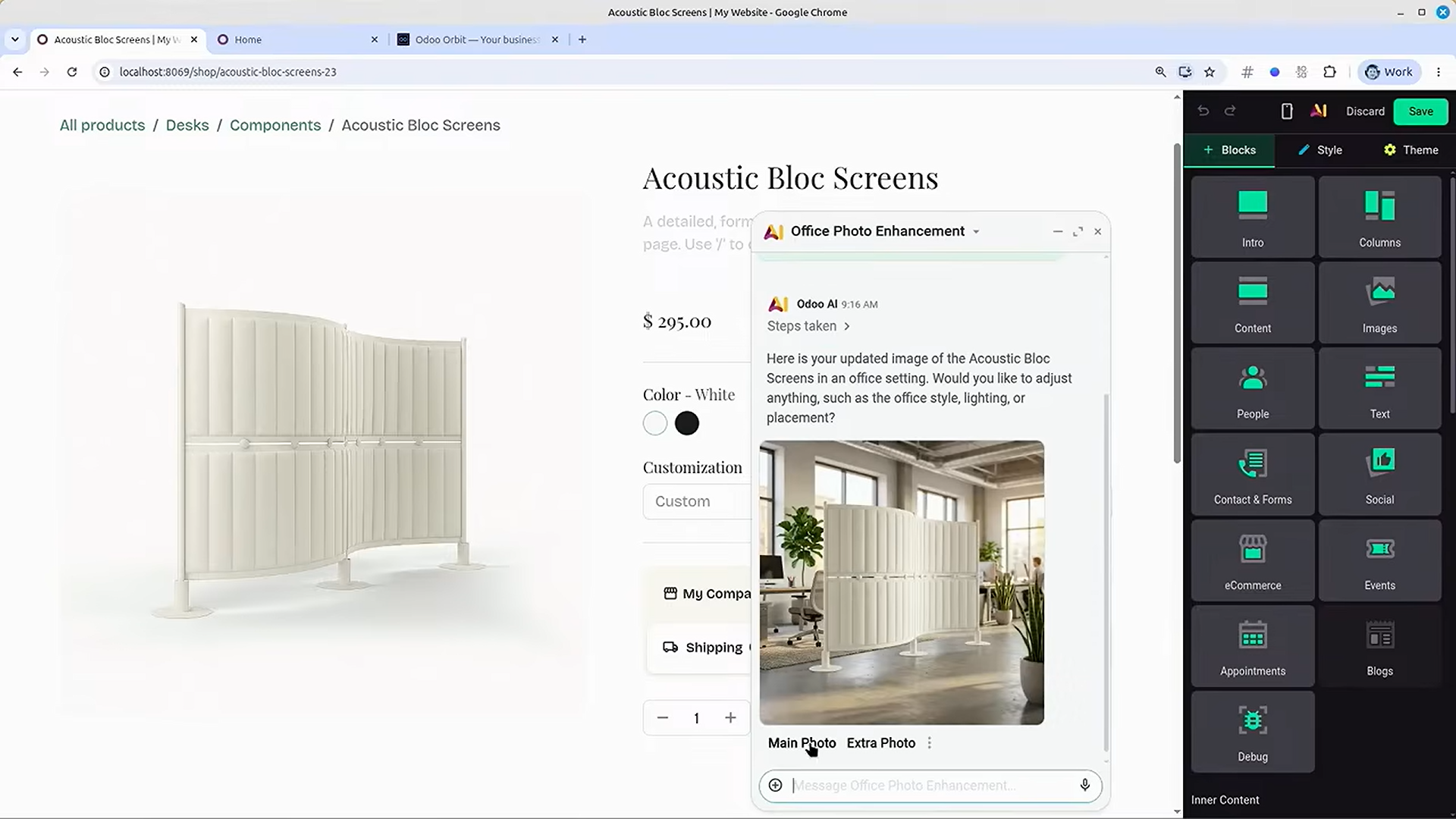
Generating and editing images
With AI, you can generate an image or edit an existing one just by describing what you want in words.
For example, you can generate an image of a product or service from a written description, or add a background of your choice to a product photo that has none.
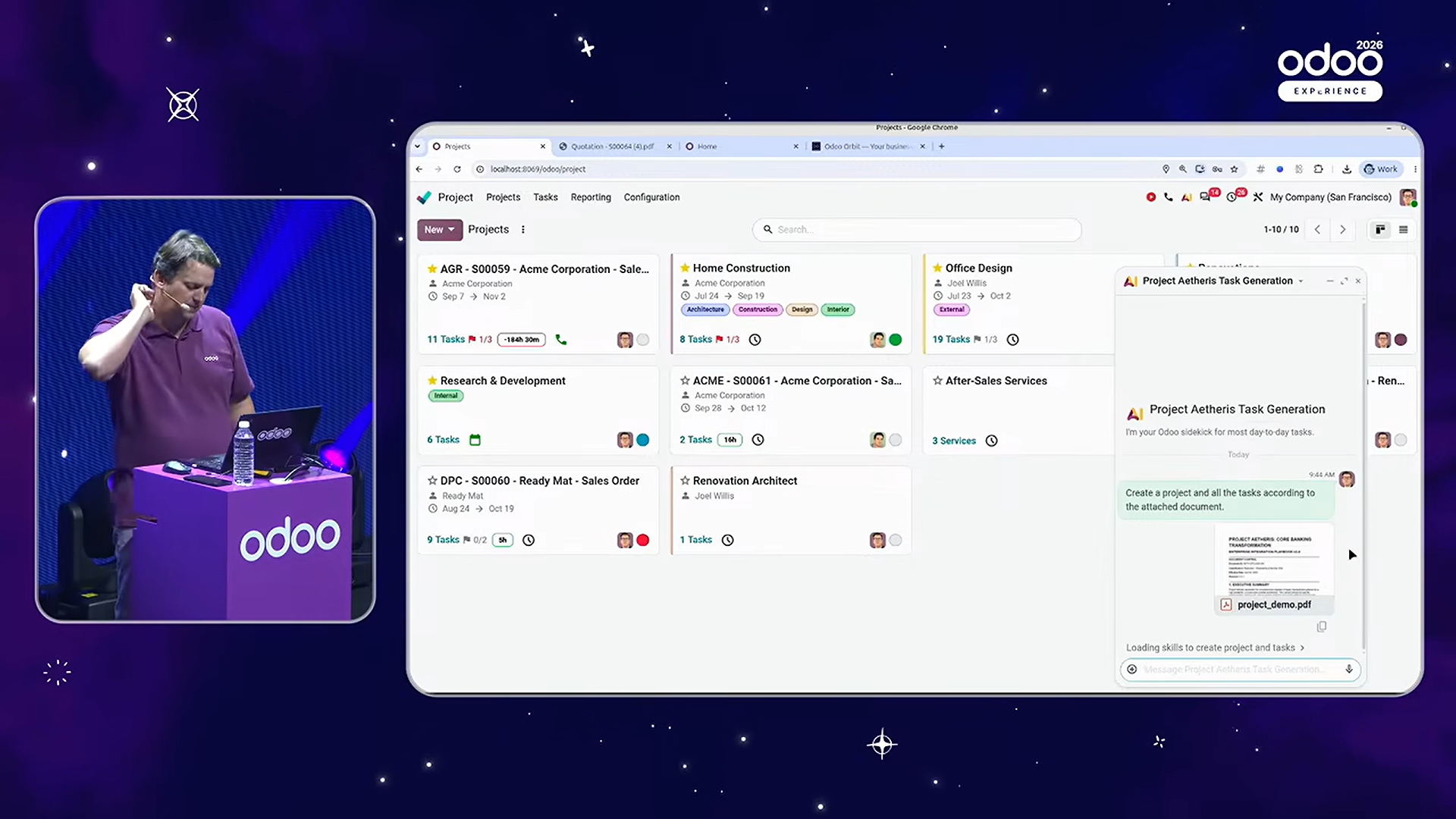
Creating and updating records
For example, give the AI a PDF file that sets out the scope of work and its tasks, and it creates the project and task records from its contents.
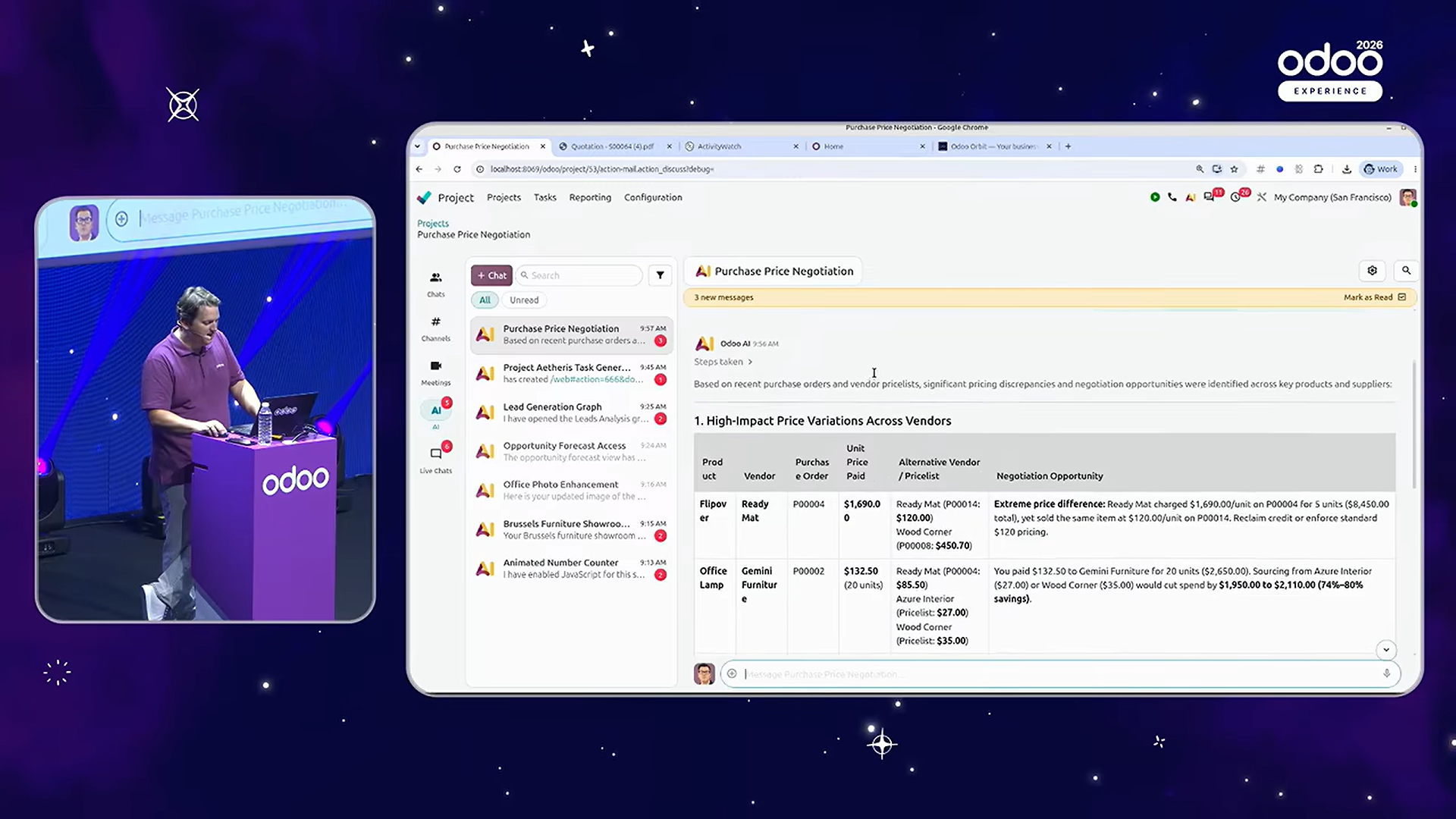
Price negotiation
The AI analyses your purchase history and, from trends in purchase prices and your record with each vendor, finds the products and vendors where there is room to negotiate on price.
Other AI features
- You can make requests by voice.
- AI agents can be called from automated actions and scheduled actions.
- By reviewing the history of the automation chat, you can check what an agent did, and give it instructions for improvement based on any errors that occurred.
- Conversations with an agent are now kept for up to 30 days after the last message.
- Skills (instructions and sets of tools that define how an AI agent behaves in a given context) are available.
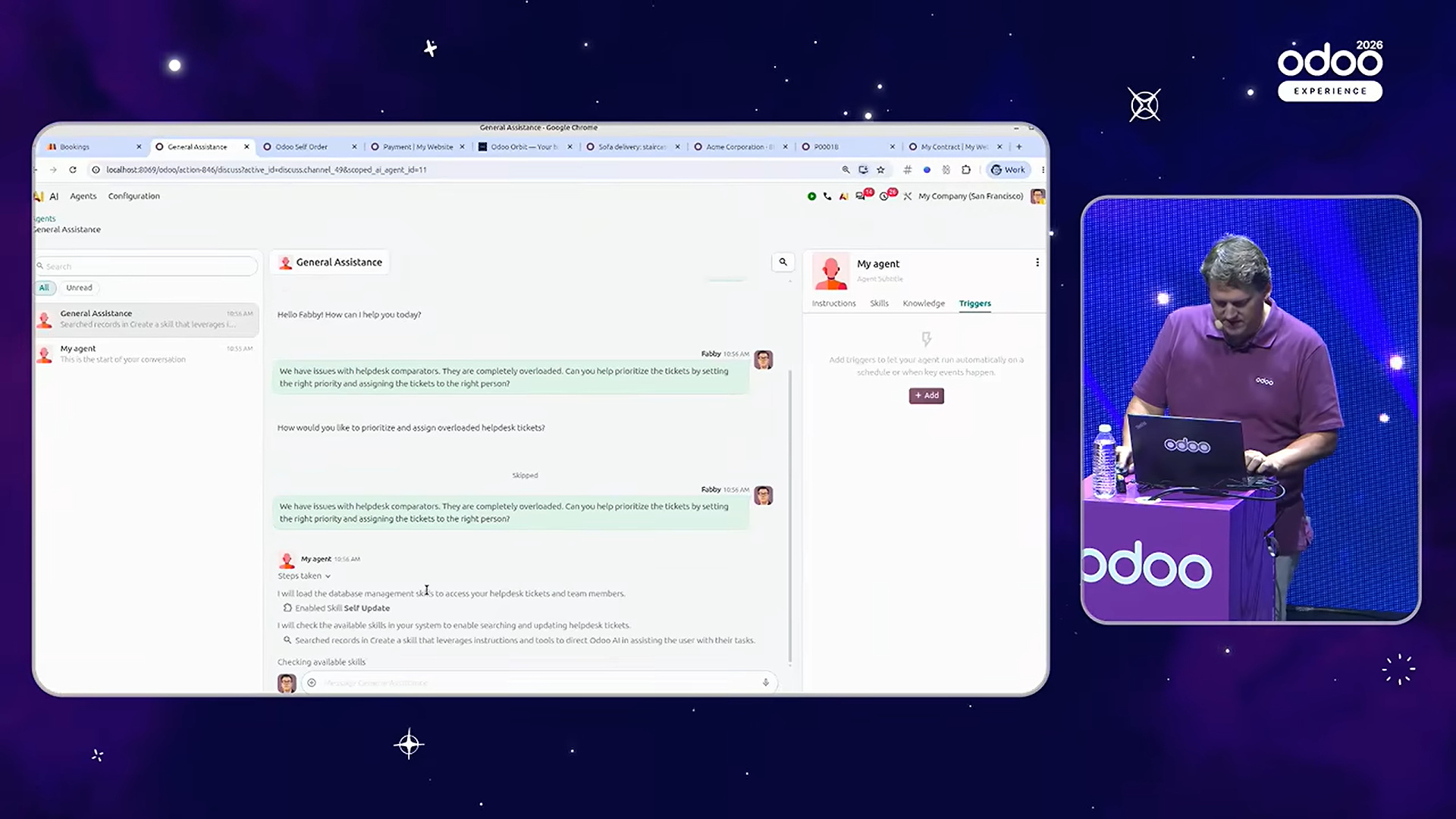
In Odoo 20, using the AI features also requires credits. Credits are bought through IAP (in-app purchases). See Odoo's website for details.
In-app purchases (IAP) (Odoo website)
In addition, external AI agents can now connect to an Odoo database through MCP (Model Context Protocol). With the right configuration, an external AI agent can read Odoo data and create and update records.
This means Odoo data can be put to use from external AI tools, not only from the AI features built into Odoo.
ERP as the foundation for AI
In Odoo 20, AI no longer just answers questions or summarises information. It is moving towards doing the actual work, such as creating and updating records and analysing information.
When thinking about using AI this way, what matters is how the business data is managed.
If data on sales, purchasing, inventory, manufacturing, accounting and customers is spread across several systems, the AI has to gather what it needs from each of them before it can understand the state of the business. If the business data is consolidated in an ERP, the AI can look across related information, and it becomes easier to process work with its background and context in view.
Of course, consolidating the data does not by itself make the AI's judgement accurate. But consistent access to the information it needs is an important foundation, both for widening the range of work that can be left to AI and for improving the accuracy of that work.
100 industry solutions (Industries)
Odoo 20 offers "Industries" (industry solutions) for a wide range of sectors.
An industry is a bundle of the apps commonly used in a given sector (manufacturing, retail, construction, services and so on), with that sector's initial configuration and workflows set up as a template.
For example, the construction industry combines the Sales, Project, Purchase, Inventory and Accounting apps, configured to manage the work from quotation through procurement of materials and work on site to invoicing.
Working out from scratch which Odoo apps to combine, how, and with what configuration takes real effort. With an industry, you can start using Odoo sooner, building on the workflows common in your sector.
Odoo 20 provides more than 100 of these industry solutions. Beyond manufacturing, construction and retail, they cover very specific trades such as hotels, restaurants, accounting firms, real estate and a wide range of services.
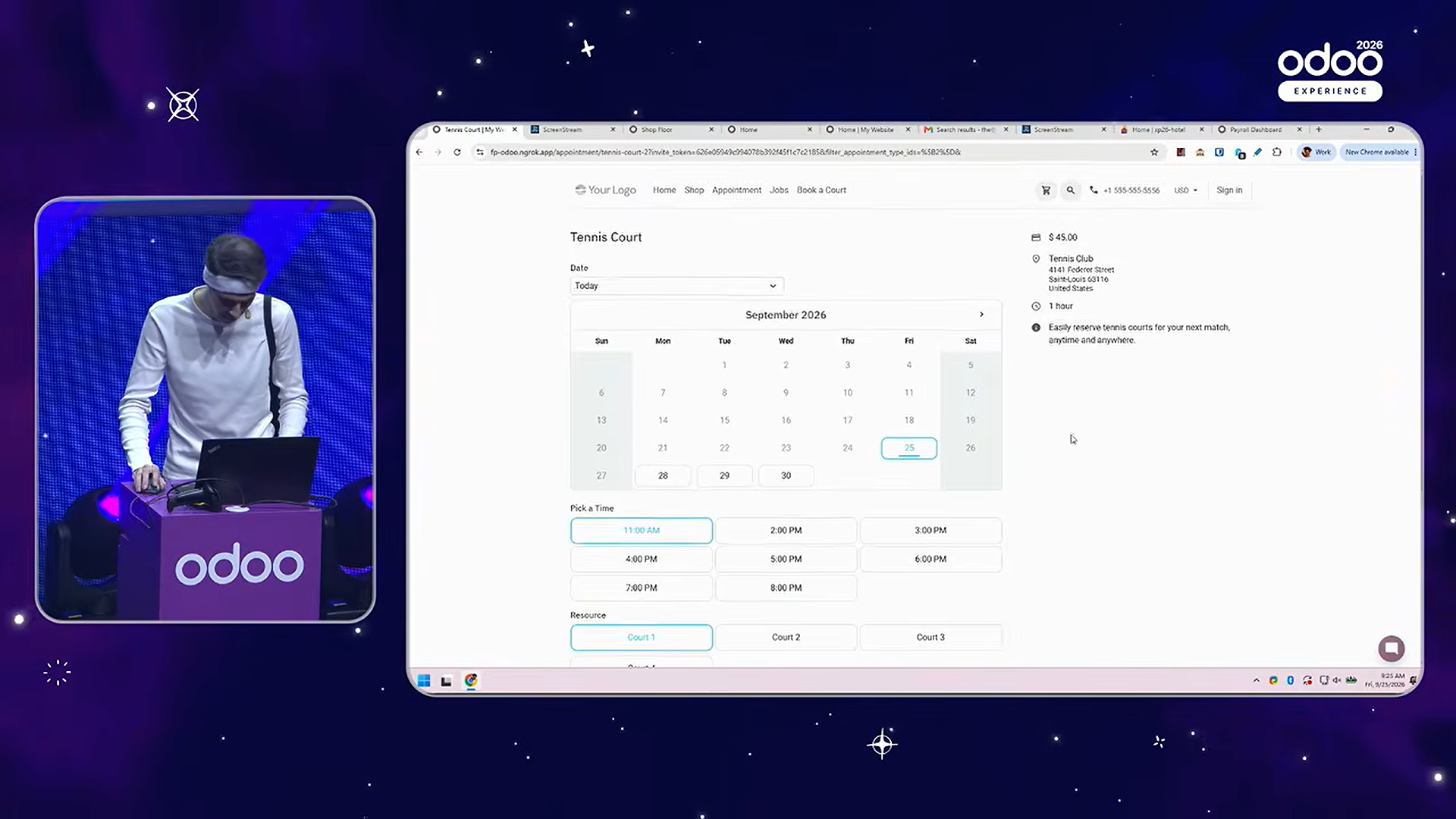
The day-two keynote included a demonstration of using industries to actually launch new businesses.
First, a club for padel, a racket sport that combines tennis and squash, was opened, with bookings, membership and merchandise sales all managed in Odoo.
The business then expanded to open a café and even a hotel. The presentation followed each of these new businesses as it was put on Odoo too, using the industry that fits each trade.
The demo shows that Odoo's industries are not just "a configuration per sector". They can serve as a foundation for quickly setting up the business systems a sector needs when you start a new business in it.
Other improvements
Beyond AI and the industry solutions, Odoo 20 brings a great many improvements across the apps.
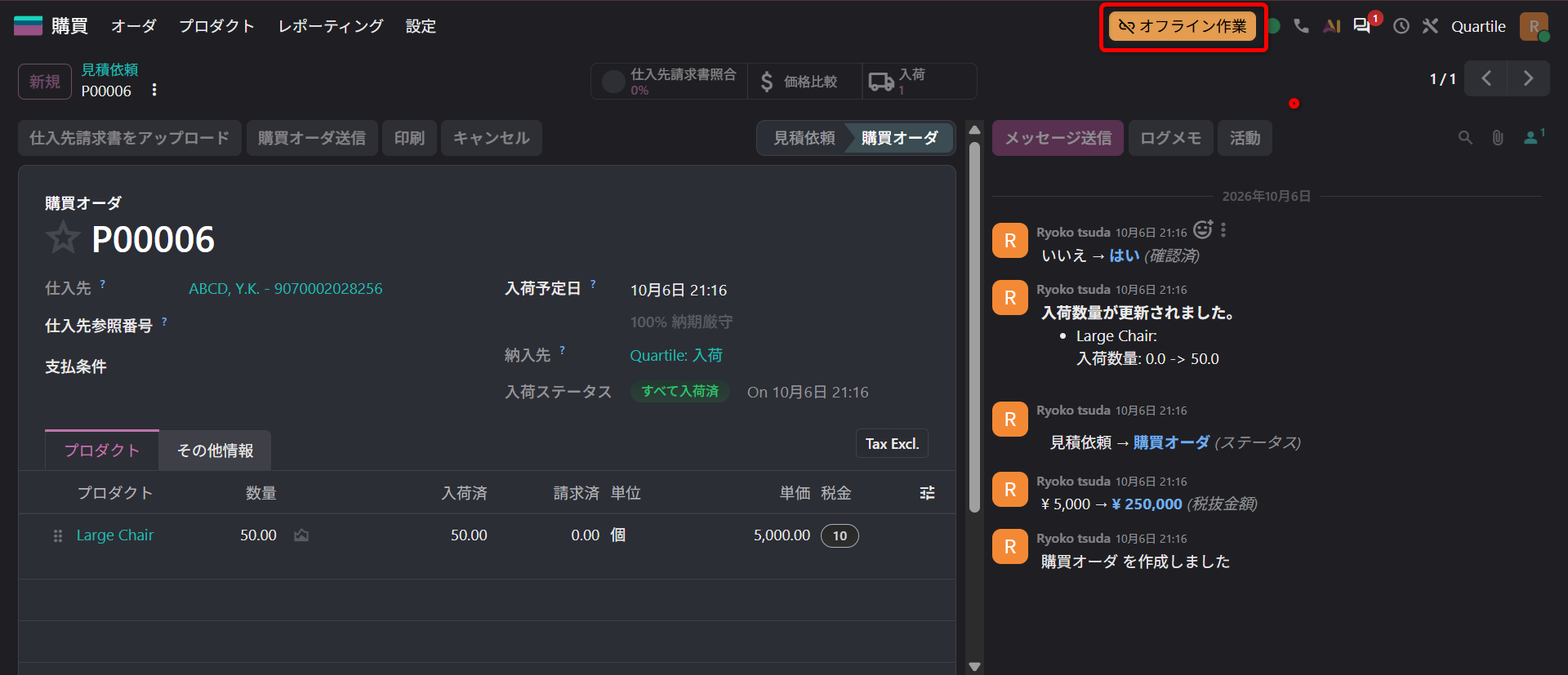
Working with records offline
Even while temporarily offline, you can create, edit, archive, unarchive and delete records.
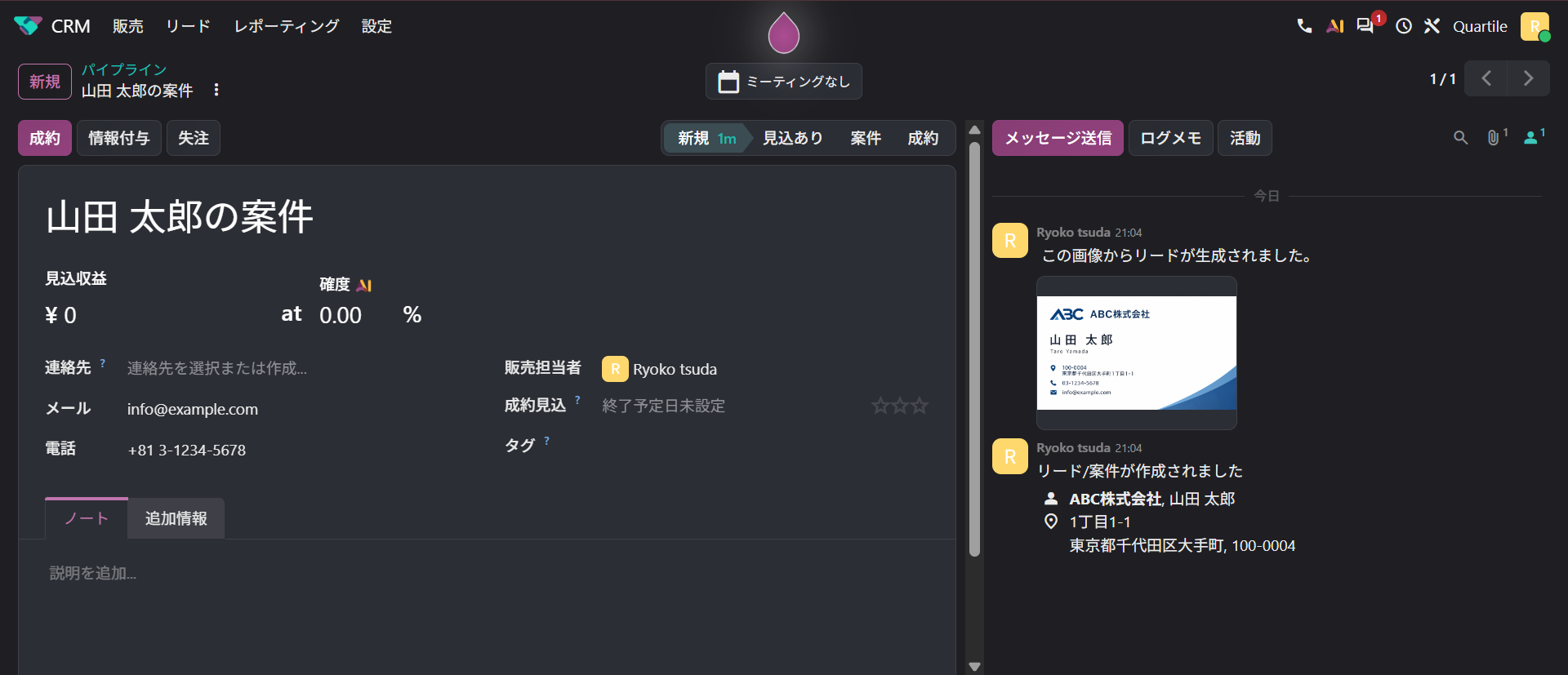
Creating leads from business card images
You can create a lead from a business card, including a Japanese one.
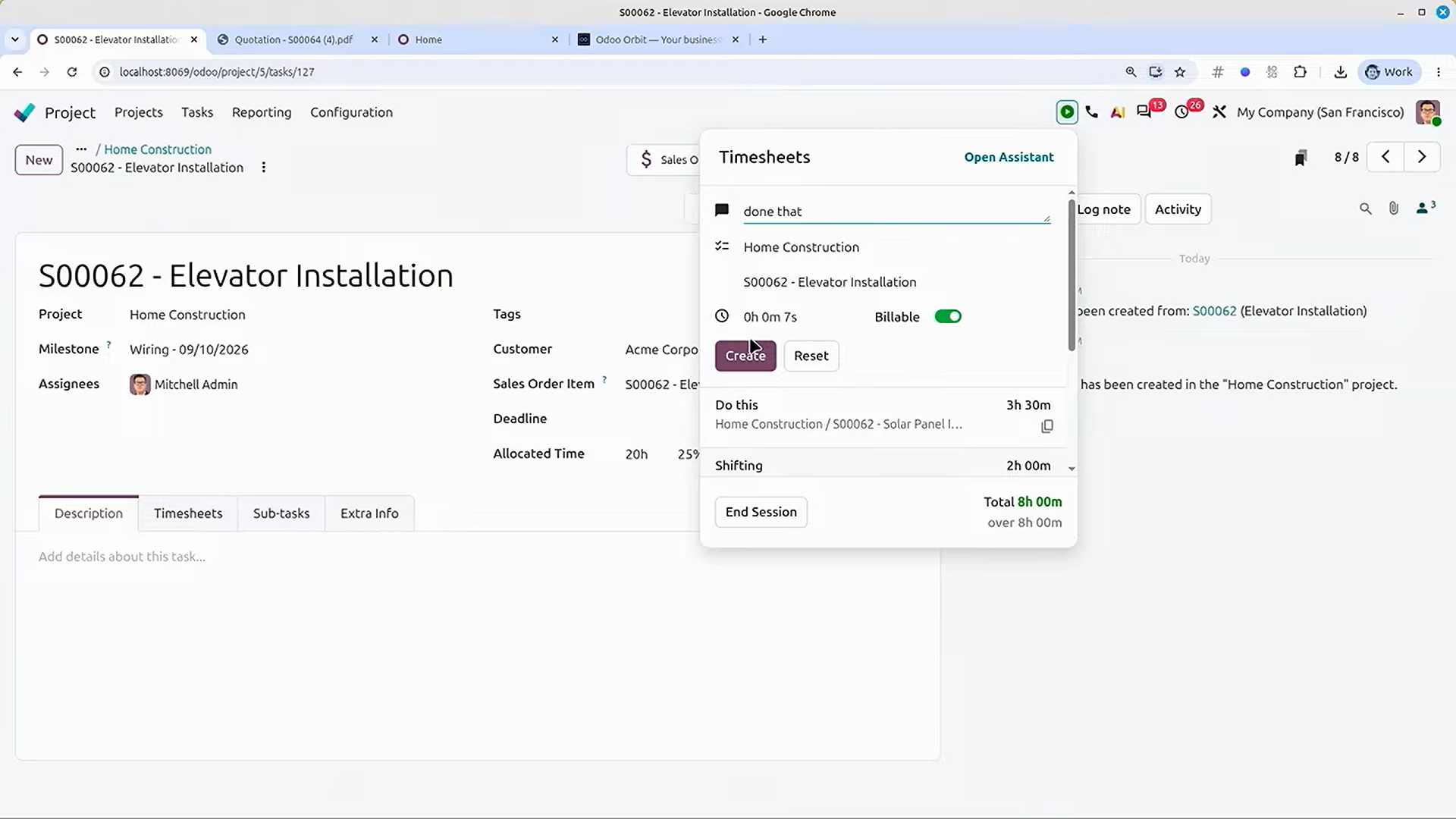
Recording timesheets
Use the timer in the top menu to time your work and record it in a timesheet from any screen.
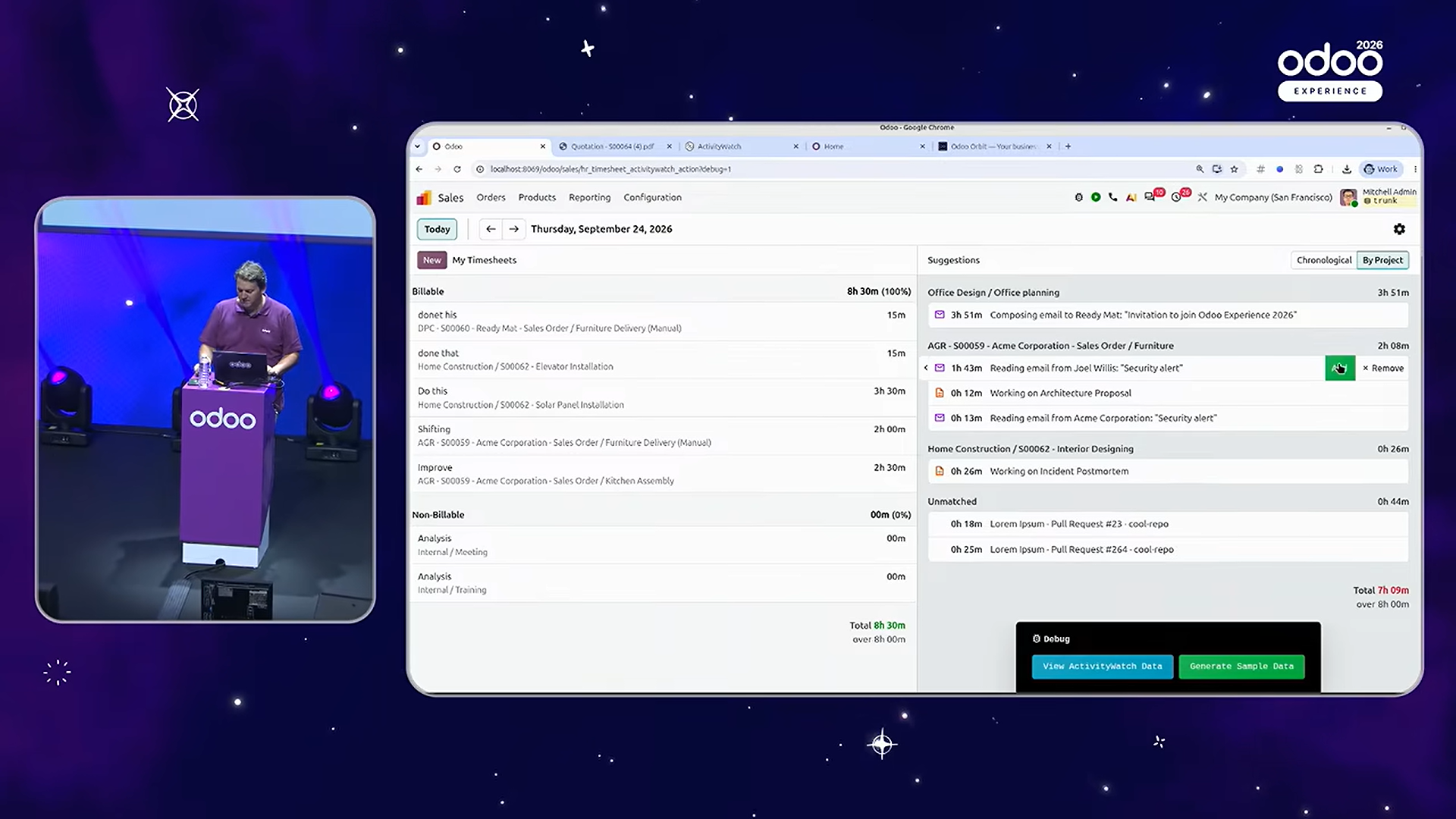
Install the ActivityWatch app on a device, and it records activity on the device automatically and turns it into timesheets.
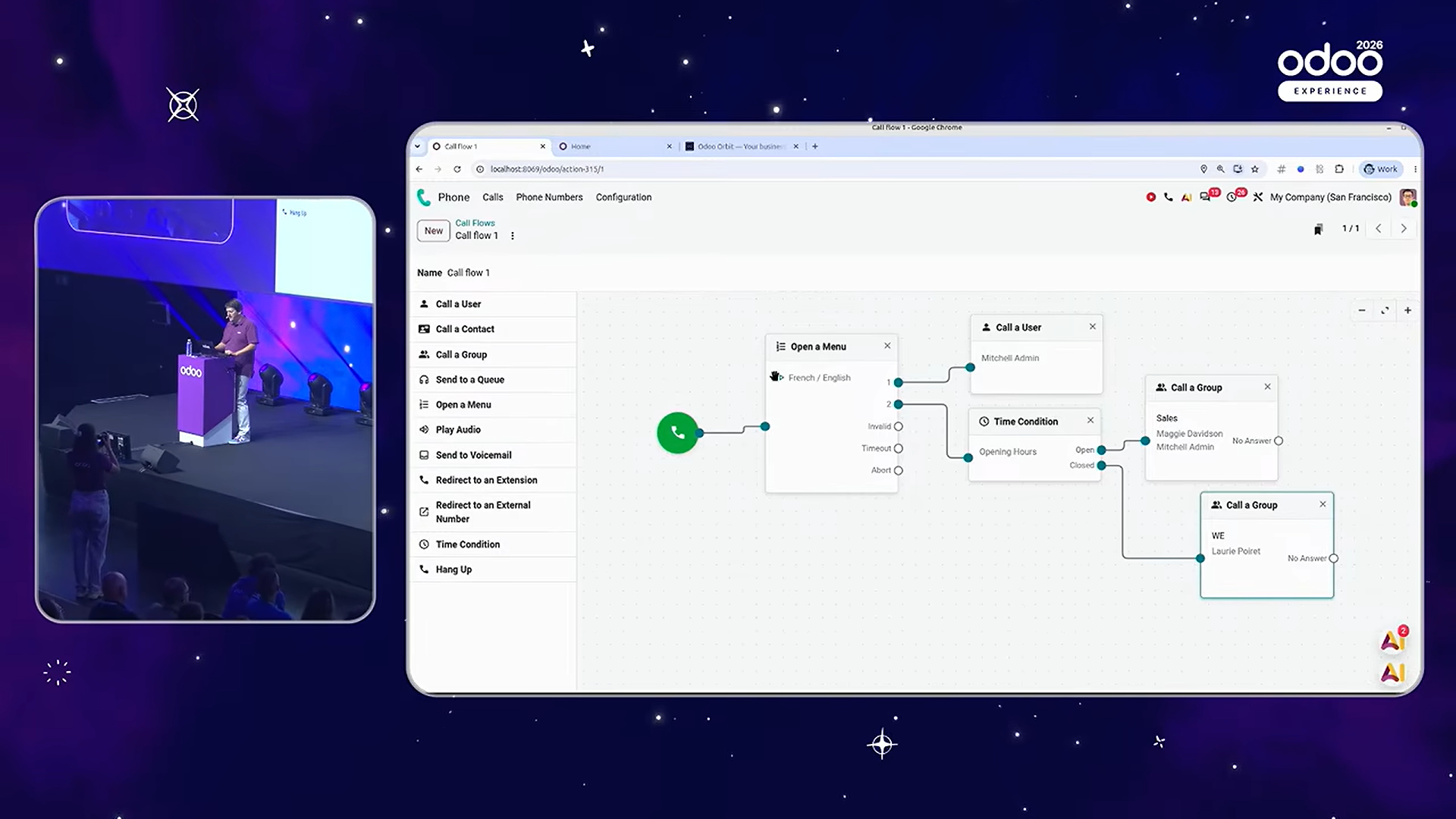
Designing VoIP call flows
You can now design incoming call flows intuitively, using the full range of business phone (PBX) features: extensions, voice menus (IVR), and routing by time of day or location.
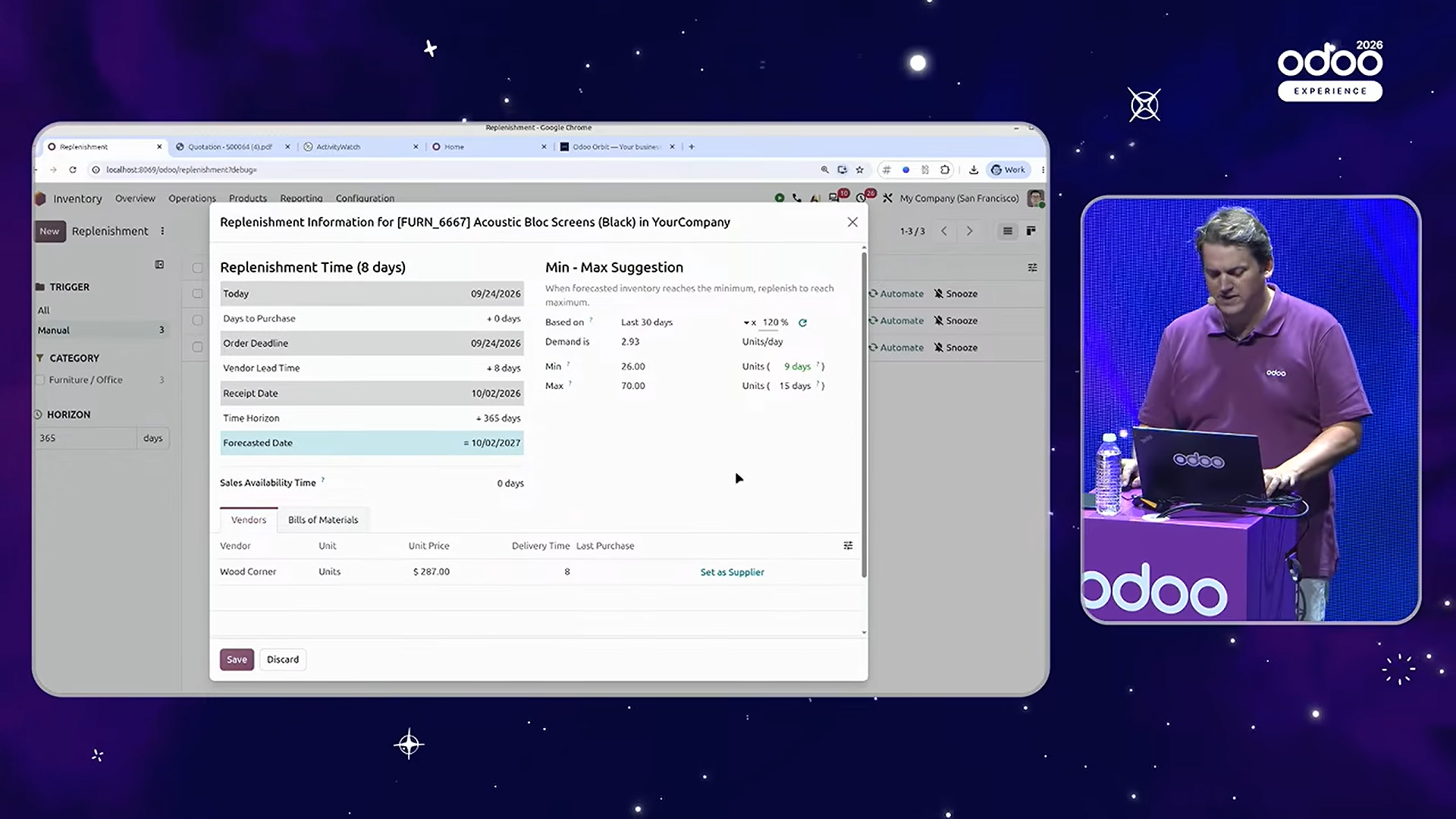
Suggested stock levels on reordering rules
The minimum and maximum quantities on a reordering rule are now suggested automatically, based on past demand, the minimum days of cover you set (how many days' stock to hold), and how often you buy.
Scheduling work orders
In the kanban view of work orders, you can set the priority of the work by dragging and dropping the cards into order.
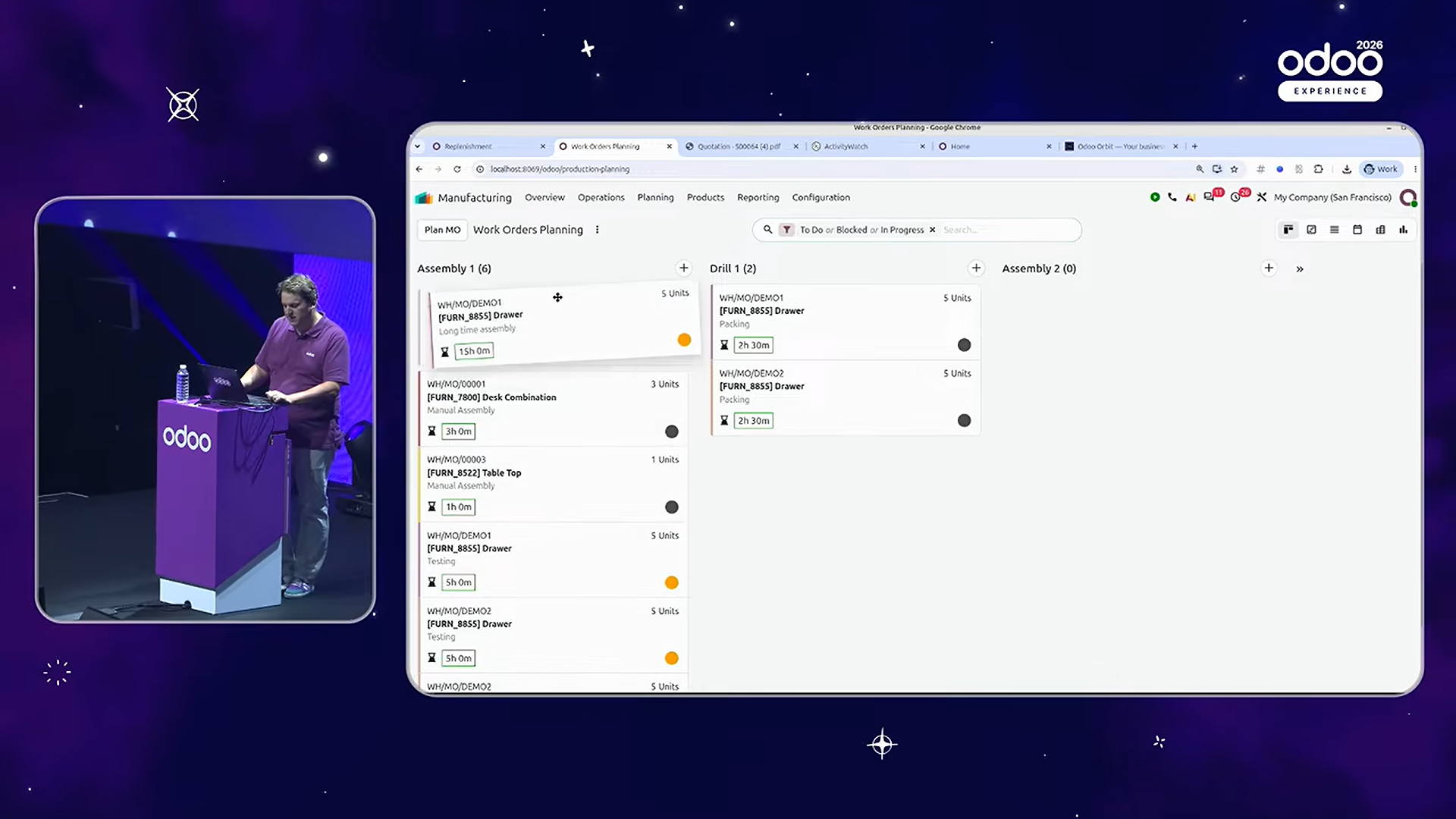
There are many more improvements across the Odoo apps. Odoo 20 makes a strong impression as "the AI version", but in fact its everyday usability as an ERP has steadily improved too.
Pricing changes
Odoo 20 changes not only the features but also the pricing.
Since its 2022 pricing change, Odoo has had a simple pricing model in which the price is mainly set by the number of users. This revision raises the Custom plan by 20%, citing recent inflation and the rising costs of AI, hosting and IT. The price of the Standard plan is unchanged.
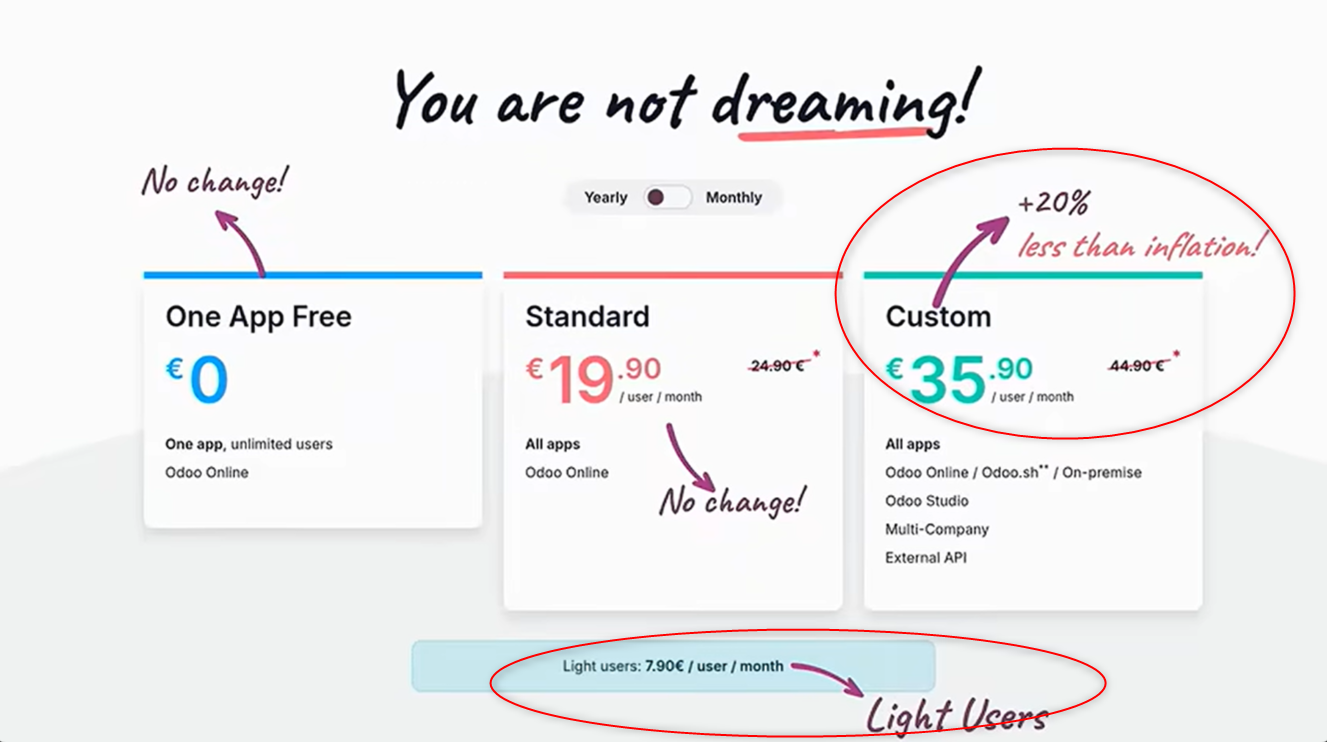
A new lower-priced licence with limited features, the "Light User", has also been introduced. It is for employees who do not need all of Odoo's features, and lets them use Odoo for just the work they need.
For example, on the HR side, they can use their own time off requests, expenses, attendance, appraisals, referrals, planning and so on. They can also use some operational features, such as Field Service, barcode operations in Inventory, reading Knowledge, PoS and the shop floor. They cannot, however, use the main business apps such as Sales, Purchase, Project and Accounting.
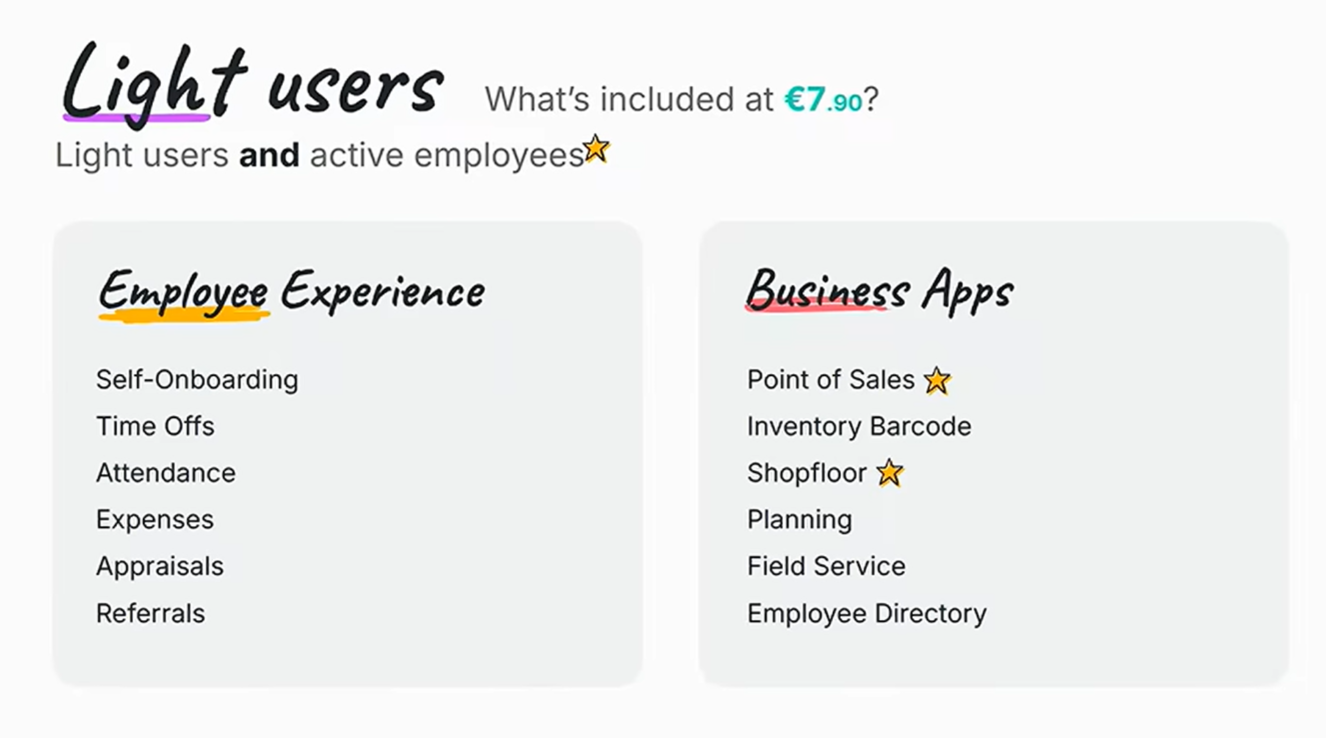
Odoo pricing plans (Odoo website)
The point to watch in this revision is that people registered as employees without a regular user account may, depending on the conditions, now be charged for as Light Users.
So depending on how employees are registered, licence costs you had not planned for may arise, and not only for the users who work in Odoo directly. Companies already on Odoo should check their current user make-up and contract terms.
For companies with many employees in particular, this pricing change could have a large effect on the overall cost of the system.
Whether a company sees this revision simply as a price rise will vary. But at the very least, licence costs now have to be considered even for employees who did not use Odoo before, so for some companies the cost of adopting Odoo may be higher than it was.
On the other hand, a company that makes full use of the Light User features, and has many employees who do not use Odoo for sales, purchasing, projects or accounting, may even end up paying less than under the previous pricing.
In short, we think the effect of this pricing change is less a simple price rise than something that varies widely with how each company uses Odoo and how its users are made up.
Japanese localization
The sessions did not cover the localizations for individual countries, so we look at the Japanese localization from the Odoo 20 release notes.
Balance sheet and profit and loss
The balance sheet and the profit and loss statement now comply with the "General Accounting Guidelines for Small and Medium-sized Entities" (SME accounting guidelines).
Updated chart of accounts
The chart of accounts has been updated to cover the main business cases and to comply with the SME accounting guidelines and the e-Tax code system.
Tax returns
A "consumption tax" section has been added to the tax return for both the general and the simplified taxation methods.
It also handles the different ways of calculating consumption tax, such as the accumulation method for sales, the sales rebate calculation method and the itemised method.
Zengin support
Since Odoo 19, Odoo has also supported creating batch payment data in the Zengin format and importing bank statements.
See the forum post below for details.
Generating Zengin-format transfer data
Beyond these, we are passing Japan-specific requests on to Odoo, such as better handling of corporate tax returns and tax processing, management of promissory notes and electronically recorded receivables, and data export to the main accounting and tax filing software, with practical input from tax accountants who have experience with Odoo.
Odoo has replied that it will consider them, weighing how useful each feature is and its priority.
The Japanese localization has long tended to be put off. But that is changing, as Odoo becomes better known in Japan and more companies there use it.
We expect the Japanese localization to keep improving, as practical requests from Japanese users and specialists continue to reach Odoo and are considered on their usefulness and priority.
Summary
Odoo 20 advances on a broad front: AI agents that carry out work, more than 100 industry solutions, and improvements across the apps. The Japanese localization has improved as well.
What stands out most in this release is not just that individual features have been added, but the direction it sets: managing and running all kinds of work in one system, with AI.
For companies replacing their ERP, or struggling to juggle several SaaS products, Odoo is one option worth considering. What matters is to evaluate not only the new features but also the fit with your own operations, the cost of implementation and running, and future maintenance and upgrades.
Odoo V20 released - new features and improvements