Odoo Slides & Videos
Presentation decks and explainer videos that Quartile has used at events and webinars, covering Odoo implementation, customization, Japanese localization, and open source community work.
| Last Update | 08/02/2026 |
|---|---|
| Completion Time | 2 hours 31 minutes |
| Members | 1 |
Share This Course
Share Link
Share on Social Media
Share by Email
Please login to share this Odoo Slides & Videos by email.
Odoo Overview / Know-how
View allHow to change the wording of a label on a printed report. This is part 5 of a five-part series on the recurring problems with Odoo's printed reports in Japan. The video is in Japanese.
The Odoo version used throughout is 16.0.
The problem addressed here
- a label needs different wording — for example shortening Salesperson to simply the person in charge
OCA module used
Other parts of the series
- Making Odoo's Printed Reports Work in Japan, Part 1 — Registration number and Japanese prefecture names
- Making Odoo's Printed Reports Work in Japan, Part 2 — Adding the honorifics Onchu and Sama
- Making Odoo's Printed Reports Work in Japan, Part 3 — Switching the layout to the Japanese convention
- Making Odoo's Printed Reports Work in Japan, Part 4 — Adjusting how unit prices and quantities are shown
Related links
How to adjust the displayed precision of unit prices and quantities. This is part 4 of a five-part series on the recurring problems with Odoo's printed reports in Japan. The video is in Japanese.
The Odoo version used throughout is 16.0.
The problem addressed here
- unit price and quantity fields print at a finer precision than needed, showing unwanted decimals
OCA module used
Other parts of the series
- Making Odoo's Printed Reports Work in Japan, Part 1 — Registration number and Japanese prefecture names
- Making Odoo's Printed Reports Work in Japan, Part 2 — Adding the honorifics Onchu and Sama
- Making Odoo's Printed Reports Work in Japan, Part 3 — Switching the layout to the Japanese convention
- Making Odoo's Printed Reports Work in Japan, Part 5 — Changing the wording of labels
Related links
How to switch the report layout to the form normally used in Japan. This is part 3 of a five-part series on the recurring problems with Odoo's printed reports in Japan. The video is in Japanese.
The Odoo version used throughout is 16.0.
The problem addressed here
- the layout differs from Japanese convention, putting your own company details at the top
OCA module used
Other parts of the series
- Making Odoo's Printed Reports Work in Japan, Part 1 — Registration number and Japanese prefecture names
- Making Odoo's Printed Reports Work in Japan, Part 2 — Adding the honorifics Onchu and Sama
- Making Odoo's Printed Reports Work in Japan, Part 4 — Adjusting how unit prices and quantities are shown
- Making Odoo's Printed Reports Work in Japan, Part 5 — Changing the wording of labels
Related links
How to get Japanese honorifics onto the recipient name. This is part 2 of a five-part series on the recurring problems with Odoo's printed reports in Japan. The video is in Japanese.
The Odoo version used throughout is 16.0.
The problem addressed here
- the recipient name carries no honorific such as Onchu or Sama
OCA module used
Other parts of the series
- Making Odoo's Printed Reports Work in Japan, Part 1 — Registration number and Japanese prefecture names
- Making Odoo's Printed Reports Work in Japan, Part 3 — Switching the layout to the Japanese convention
- Making Odoo's Printed Reports Work in Japan, Part 4 — Adjusting how unit prices and quantities are shown
- Making Odoo's Printed Reports Work in Japan, Part 5 — Changing the wording of labels
Related links
How to deal with the country name in the address block, a missing tax registration number, and romanised prefecture names. This is part 1 of a five-part series on the recurring problems with Odoo's printed reports in Japan. The video is in Japanese.
The Odoo version used throughout is 16.0.
The problem addressed here
- the address block includes the country name Japan
- your own tax registration number does not appear
- prefecture names are rendered in romanised English
OCA module used
Other parts of the series
- Making Odoo's Printed Reports Work in Japan, Part 2 — Adding the honorifics Onchu and Sama
- Making Odoo's Printed Reports Work in Japan, Part 3 — Switching the layout to the Japanese convention
- Making Odoo's Printed Reports Work in Japan, Part 4 — Adjusting how unit prices and quantities are shown
- Making Odoo's Printed Reports Work in Japan, Part 5 — Changing the wording of labels
Related links
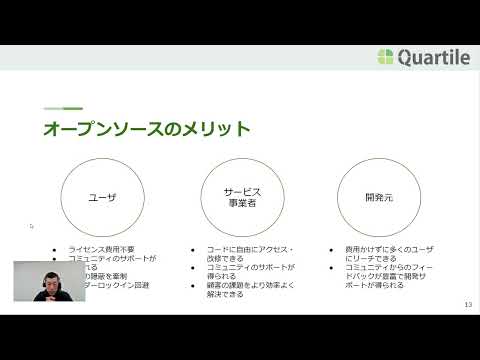
A talk on why Quartile takes part in the Odoo open source community. The video is in Japanese.
It introduces the work the company does in the community, then sets out the problems with proprietary software and what open source changes about them.
What the video covers
- An introduction to Quartile's community work
- The problems with proprietary software
- What characterises open source
- The benefits open source brings
Related links
Default channel for slides, all public users can access content of this channel.