
As you implement Odoo and put it to work, you meet situations like
"the standard features fall a little short"
"we are unsure whether to build an add-on"
more often than not.
When you do, the first thing we would like you to consider is OCA modules.
Open source, GitHub and the like sound difficult, but OCA modules are a convenient arrangement that widens your options considerably just by knowing they exist — no technical background required.
This article sets out
- what OCA modules are
- why so many companies use them
- how to go about finding and using them in practice
in plain terms.
Spreading OCA work starts with knowing what OCA modules are worth and actually using them. We hope this article is a first step towards that.
What OCA modules are
In a word: Odoo add-on modules you can use for free.
They are developed and published by the OCA (Odoo Community Association), a non-profit community that developers and companies around the world take part in.
OCA modules are not merely free; they also bring
- quality assured by community review
- continuous maintenance
- vendor lock-in that is easier to avoid
as characteristics.
That is why they also hold down the maintenance and upgrade load over long-term operation, more readily than bespoke development or a single vendor's app — a considerable benefit in itself.
For more on the OCA, see the article below.
How OCA modules differ from other app-shop modules
The app shop on Odoo's official site lists paid apps alongside free Odoo add-on apps, OCA modules among them. For why OCA modules are the ones to consider first among all of those, see the article below.
Blog post: The case for and against sourcing modules from the app market
Conditions for using and modifying OCA modules
Most OCA modules carry an open-source licence such as AGPLv3 or LGPLv3.
For ordinary use, they are free to use as you like.
Where you modify a module and redistribute it, on the other hand, licence conditions such as the obligation to publish source code may apply.
Check the licence of each module for the details.
And for modifications or improvements of general use, rather than handling them individually, giving them back to the OCA module as a pull request on GitHub is also encouraged.
How to find OCA modules
The OCA holds thousands of modules, so simply knowing "how to look" changes a great deal about how easy they are to use.
Here are the ways we recommend in practice, in order.
① Ask ChatGPT
Lately, asking ChatGPT is an effective approach too.
Ask "does the OCA have a module that does X?" in Japanese and it may suggest related modules or repositories.
The answers are not necessarily accurate, though, so treat them as a pointer and search the OCA app shop and GitHub — covered below — as well.
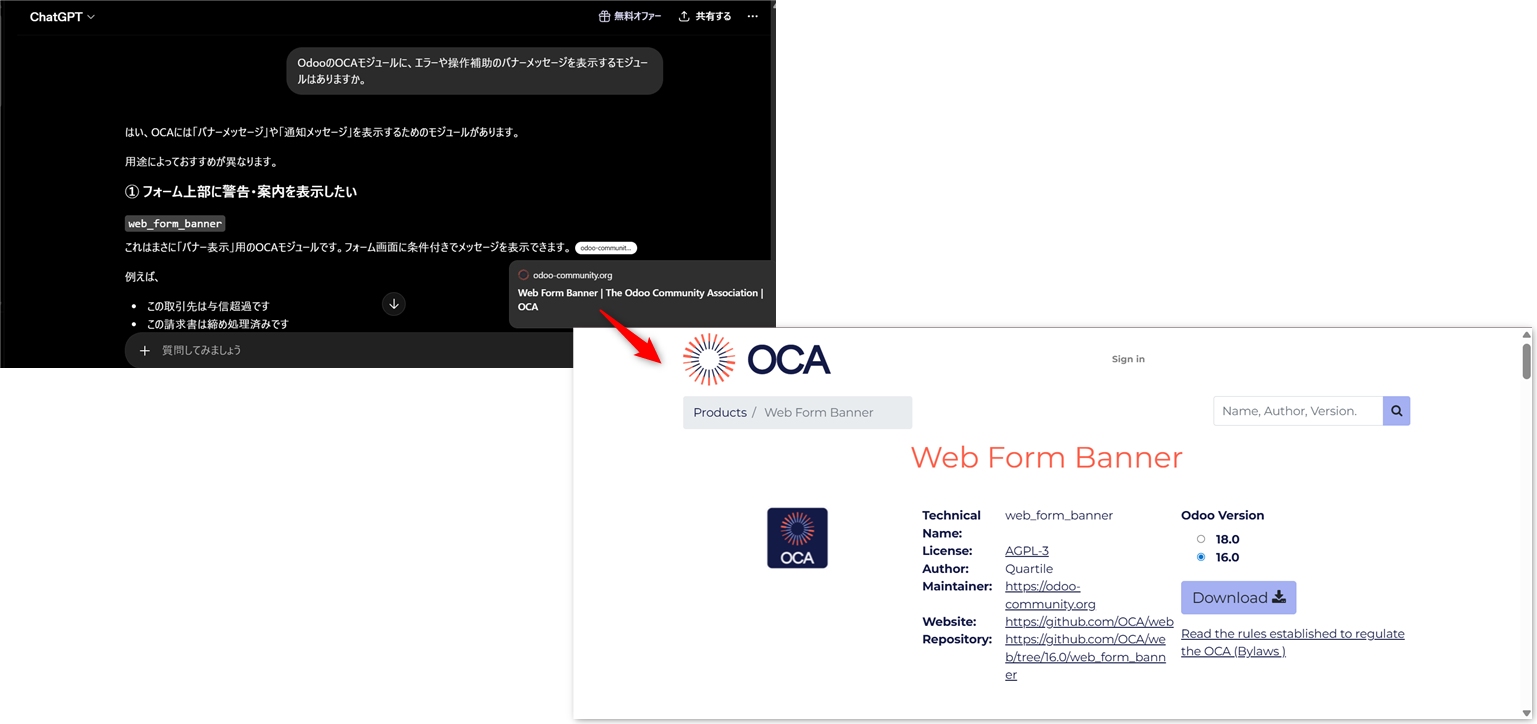
② Look through what Quartile publishes
Quartile publishes continuously about OCA modules connected to real implementations at Japanese companies and to requirements particular to Japan. You may well find a useful module through it.
■ OCA modules commonly used in Japan
They are presented on the basis of how often they are actually used, which makes this the best place to start.
■ Blog posts: monthly reports on Odoo community activity and Quartile's part in it
These cover Quartile's OCA work as it arises from Japanese customers' requests.
They are a way to learn which modules are useful at a Japanese company.
■ Quartile forum posts: https://www.quartile.co/forum/1/tag/oca-109/questions?filters=tag
These explain the configuration and use of commonly used OCA modules, in Japanese.
③ Check what is widely used around the world
■ The OCA's own list of recommended modules:
https://www.odoo-community.org/resources/documentation
Base, accounting, sales, purchasing, project and more —
modules in use worldwide, presented by category.
④ Search the OCA app shop
■ The OCA app shop:
https://apps.odoo-community.org/shop
A keyword search will turn up a great many modules.
Points on searching for a module
OCA modules are published in English, so the search keyword matters.
Start by switching the Odoo screen to English and checking the English terms Odoo itself uses.
Search the OCA app shop on those keywords, and look for modules or repositories that seem related.
Some modules and versions do not appear there, though, so we recommend using GitHub search alongside it.
⑤ Look through the GitHub repositories (for the more advanced)
Where the OCA app shop turns nothing up, or where you want to see the latest state of development, refer to GitHub.
GitHub OCA:
Points on searching GitHub
- infer what a module does from its name, then check the README for the detail
- check the branches for other versions too
- check unmerged and closed pull requests as well
Even where the feature you want is not an exact match, cases like
- it looks usable with a little modification
- it exists on another version
are extremely common.
When that happens,
- writing a pull request that extends the feature
- porting it to another version
yourself is a substantial contribution in itself.
Note that the OCA repositories on GitHub are very numerous, and the READMEs and source code are in English, so a non-engineer may find the bar a little high. We recommend starting from Japanese articles or from introductions to modules with a track record.
Translating OCA modules
Even once you have found an OCA module you want to use, the Japanese translation may be missing or thin. Where it is, do take on the translation work as well.
For how to translate OCA modules in Weblate, please see this deck.
How to install an OCA module
The basic steps are as follows.
① Download the module
Download the module you want from GitHub or the app shop.
② Add the directory to addons_path
Add the directory where you put the OCA module to addons_path in Odoo's configuration file (odoo.conf).
③ Update the app list, then install
Update the app list from Odoo's Apps screen, and install the module in question.
The steps for installing an OCA module when using Docker Desktop are covered in the second half of the article below.
How to set up an Odoo environment on a Windows PC, step by step
In summary
The more people use an OCA module, the more it improves, and the more valuable it becomes.
At first "using a convenient module" is quite enough, but once you are used to it you can take part in the community through improvement proposals or translation — which is much of the OCA's appeal.
How to contribute to OCA modules is covered in detail in the blog posts below.
Put OCA modules to work: how to find them, what they are worth, and how to install them