
Anyone weighing up Odoo may well have been disappointed to find that, with the standard features as they are, 「御中」 and 「様」 do not appear on quotations, invoices, purchase orders and the like without customisation — and for those people, good news.
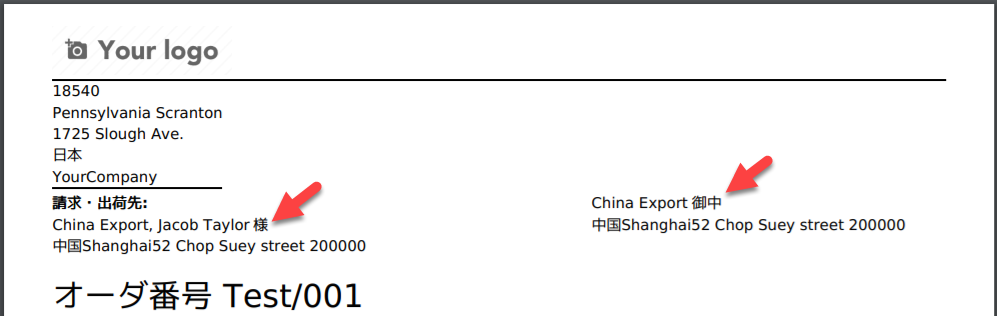
In the OCA's localisation repository for Japan we have added a module that displays 「御中」 or 「様」 on a report according to the partner's own setting.
https://github.com/OCA/l10n-japan/tree/11.0/l10n_jp_partner_title_qweb (V11 only at the time of writing)
We received a great many comments on the pull request while this was being added. The addition also owes an indirect debt to one of our customers. Thank you to everyone who helped.
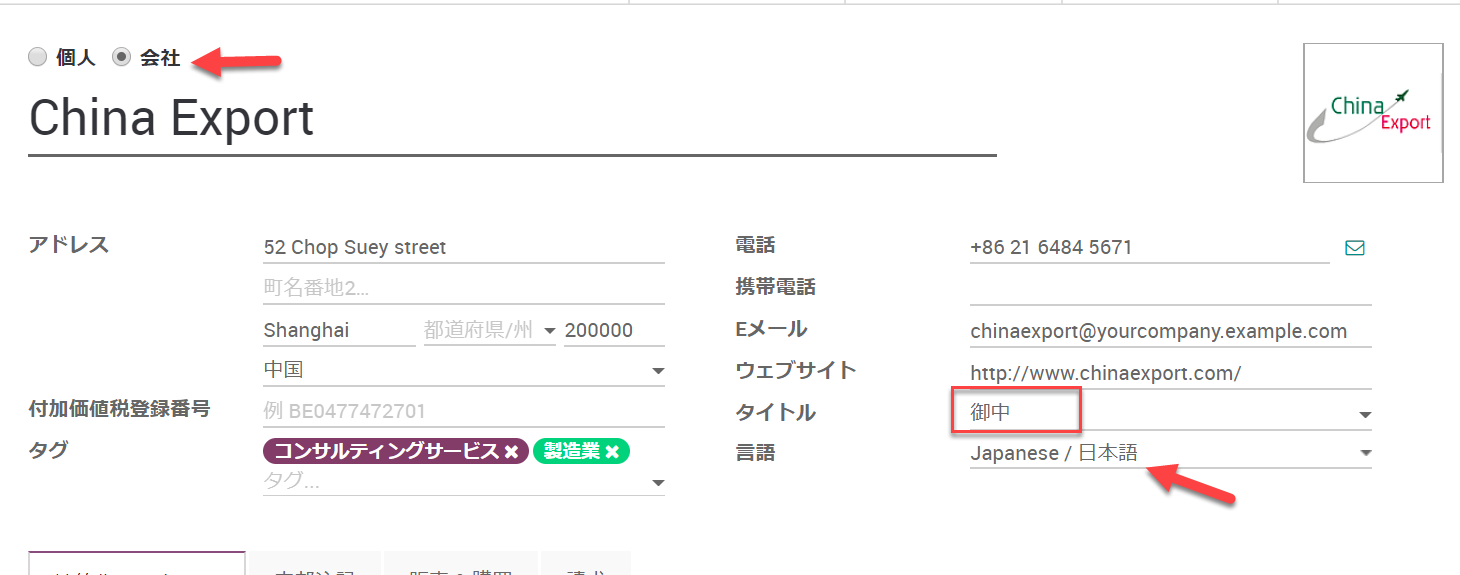
Using it could hardly be simpler. Install the module, choose 御中 or 様 in the partner's title field, and the title you picked appears as it is on that partner's reports.
We have also saved you having to pick 御中 or 様 each time a partner is created: by default, a partner whose language is Japanese and whose type is "company" is offered 「御中」, and one whose language is Japanese and whose type is "individual" is offered 「様」.
We hope this module makes Odoo that bit easier for you to work with.
It is open source as ever, so if you have suggestions for improving it, please create an issue on the GitHub repository.
Reports can now print 御中 and 様 after a partner's name