
This post was published in May 2014. The Japanese chart of accounts template distributed here was later built into Odoo itself, and the download link in the post no longer works. See The Japanese chart of accounts template has been built into Odoo itself for the details.
We have built a chart of accounts template module for Japanese companies. It can be downloaded from here.
How to install it
1) Download the module from the link above
2) Place the module in the designated addons directory on the server
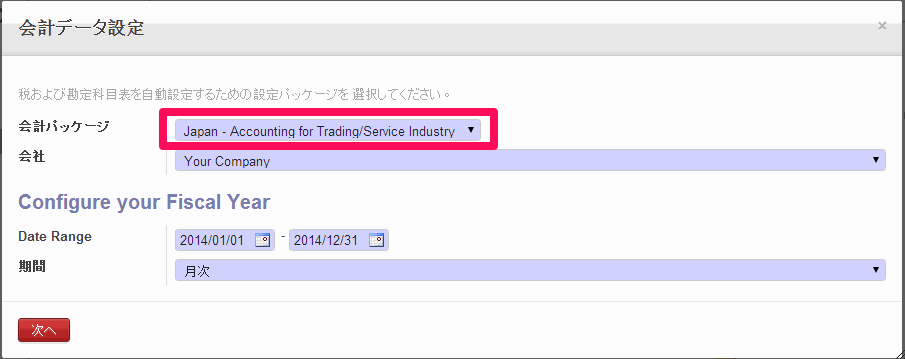
3) In the accounting data setup wizard that appears when the finance and accounting module (「account_accountant」) is installed, choose "Japan – Accounting for Trading/Service Industry" as the accounting package
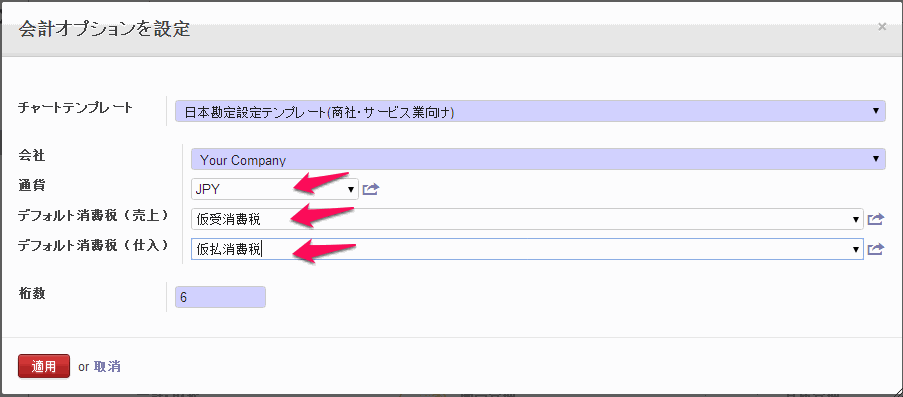
4) On the accounting options screen, set the currency, the default sales tax and the default purchase tax
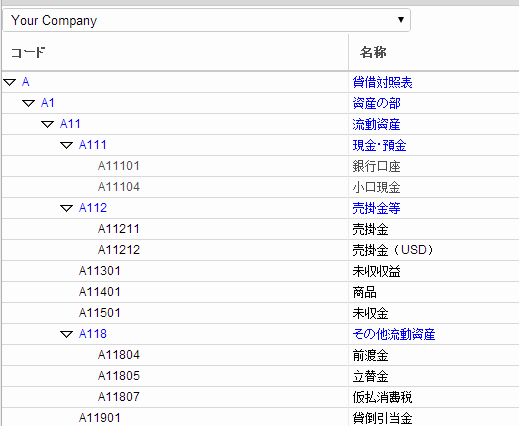
Installing it defines a chart of accounts for Japanese companies, as in the next image.
Tax settings related to trade are registered too — tax definitions for consumption tax received and paid, export exemption and overseas purchases, definitions for tax adjustments on overseas transactions, and so on.
Using this for real accounting will need adjustment, but where the gap with your own chart of accounts is not large, we think you can take the template as a base and add or remove accounts from there.
Beyond that, businesses offering OpenERP services may find it useful when demonstrating OpenERP's accounting features to a customer.
If you try the module and notice anything — points that would be better improved, say — do let us know.
We have released a Japanese chart of accounts template